A guide to ITIL 4 incident and problem management

Picture this: it’s Monday morning, your team just got through a major outage over the weekend, and everyone’s exhausted. But before the coffee even kicks in, a new ticket comes in—different system, same kind of issue. Sound familiar?
For IT service management professionals and IT leaders, this cycle of firefighting is all too common. The real challenge often lies not in fixing the immediate outage, but in preventing the next one.
In ITIL 4, confusion arises: what’s the ITIL problem vs incident, and why does mixing them trap teams?
This guide is for ITSM professionals and managers ready to cut downtime, reduce stress, and stop issues. You’ll get clear answers to questions like:
- “What’s the difference between an incident and a problem in ITIL 4?”
- “How do we move from constant firefighting to proactive prevention?”
You’ll also see how tools like Virima apply these practices seamlessly, helping teams break cycles and prevent disruptions.
Understanding ITIL problem vs incident
One of the biggest challenges in IT service management is telling the difference between an “incident” and a “problem.” Many IT teams have used these terms, problems, and incidents interchangeably, which often confuses.
Thankfully, ITIL 4 gives clear definitions that make it easier to understand the difference.
What is an incident in ITIL 4?
ITIL 4 defines an incident as an unplanned interruption—simply, an outage or disruption affecting users. In simple terms, it’s an outage or disruption that impacts users.
The main goal of the IT incident management process is to restore service operating conditions as quickly as possible.. This often means applying a quick fix or workaround to get things running again.
Example: If your company’s email server suddenly crashes, that downtime is an incident. Incident management focuses on quickly restoring email by rebooting servers or using backups to minimize user disruption.
What is a problem in ITIL 4?
ITIL 4 framework defines a problem as “the cause, or potential cause, of one or more incidents.” In layman’s terms, a problem is the root cause behind one or more service interruptions.
Problem management focuses on diagnosing and removing these root causes so incidents don’t happen again. While incident management is about quick relief, IT problem management is about long-term cures.
Example: If an email server crashes from a software bug or configuration error, that flaw is the problem. Fixing it—by applying a patch or correcting the configuration—prevents future crashes. In ITIL, you’d record this issue as a problem and perform root cause analysis to eliminate it.
Why does the distinction matter? An incident is the effect—the visible outage—while a problem is the cause, such as the flaw behind that outage. Both need attention, but in different ways. If teams treat them the same, they may only focus on quick fixes without addressing root causes.
The goal of ITIL-aligned service management is not just to resolve incidents, but to learn from them. Every major incident should raise the question: “What caused this, and how do we stop it from happening again?”
Altogether, this mindset reduces repeat outages and steadily improves service quality.
Phases of ITIL 4 incident management
When an incident happens, ITIL 4 suggests using a structured process—called an ITIL practice—to handle it efficiently. The incident management process follows a series of clear steps that guide the response from start to finish.
Below are the main stages in the ITIL problem vs incident lifecycle, along with what each step involves.
1. Preparation (readiness planning)
Preparation is the first step in effective incident response. This phase happens before any incident occurs. It also involves creating response policies, defining reporting channels, training support teams, and implementing monitoring tools. In short, your organization builds a “fire drill” plan for outages.
Example: An IT team may draft an incident response plan, assign rotations, and document communication for detected incidents.
2. Detection and reporting
The next stage begins when an incident first comes to light. This involves detecting issues via monitoring, alerts, or user reports, then logging them in the correct system. Next, detection might come from a network monitor flagging a down server or from a customer reporting a service outage.
Once you detect the incident, record it in the IT service management system with all key details. Ongoing monitoring is especially important here, since it can catch incidents quickly or even flag early warning signs. Fast and accurate reporting creates the foundation for a faster resolution.
3. Classification and prioritization
Not all incidents carry equal weight; prioritize incidents because a minor glitch differs from a major outage.
Example: A website outage may be P1 critical, while one user’s error ranks lower. Proper prioritization makes sure that the most serious issues get immediate attention and resources. This triage step is essential to coordinate response efforts effectively.
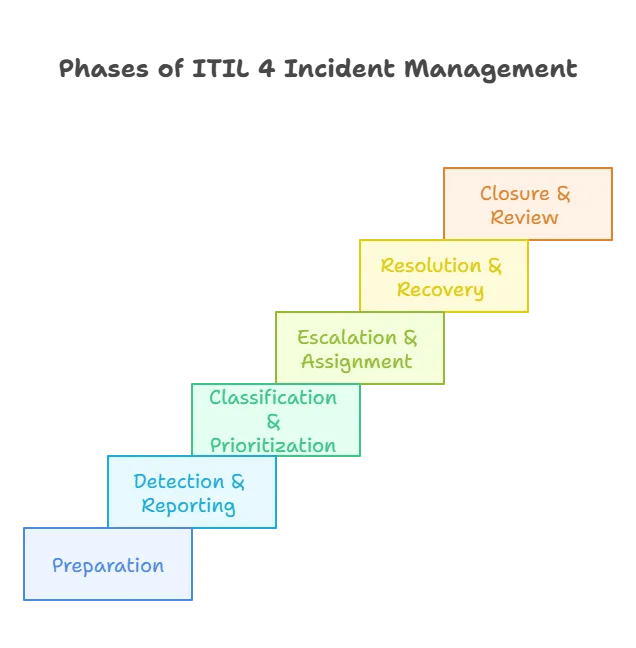
4. Escalation and assignment
After the initial triage, if first-line support can’t resolve the issue quickly, the incident should be escalated. Escalation takes two forms: functional, involving specialists, or hierarchical, alerting management for severe incidents.
Under ITIL, Tier 2 or Tier 3 support handles incidents that remain unresolved or require advanced skills.
Example: If the service desk can’t restore a database, escalate the case to the database administrators.
The goal is always the same: involve the team best equipped to respond to incidents and resolve them quickly. Clear escalation procedures, along with timely notifications and complete incident details, help reduce resolution time.
5. Resolution and recovery
In this phase, the support team resolves the incident to restore the service to normal operation. This may also involve applying a fix, restarting systems, rolling back updates, or using workarounds to restore service.
Once you fix the issue and confirm restoration through testing or user feedback, you achieve recovery. It’s important to document what the resolution was (for knowledge base records). For critical incidents, further ensure you communicate the resolution to stakeholders.
6. Closure and post-incident review
After resolution, the service desk formally closes the incident ticket. This often involves confirming with users or monitoring systems to ensure everything is back to normal.
Closure means more than ticking a box—it records details, fixes applied, and marks the incident resolved.
For major incidents, ITIL recommends a post-incident review. The team reviews the timeline, discusses what went well or poorly, and checks for any underlying problems that caused the outage.
If you find a root cause, hand it over to IT problem management for deeper analysis and a permanent fix. This review step further ensures the organization learns from every incident and continuously improves service quality.
Note: In ITIL 4, incident management is considered one of 34 practices rather than a strict step-by-step process. Still, the stages above reflect common best practices. The goal is clear: restore service quickly to reduce impact, then prevent repeats by fixing root causes.
Why proactive problem management is so challenging (Yet crucial)
Every IT team wants to stop incidents before they happen—that’s the goal of proactive problem management processes. In ITIL terms, this means studying incident trends and data to spot and fix issues before they turn into outages.
It’s like fireproofing your IT environment instead of constantly putting out fires. Of course, reaching this proactive stage is easier said than done.
The elusive goal of proactivity: Many IT teams find proactive problem management difficult, sometimes even impossible. Why is that? Here are some common obstacles that make proactive problem-solving such a challenge:
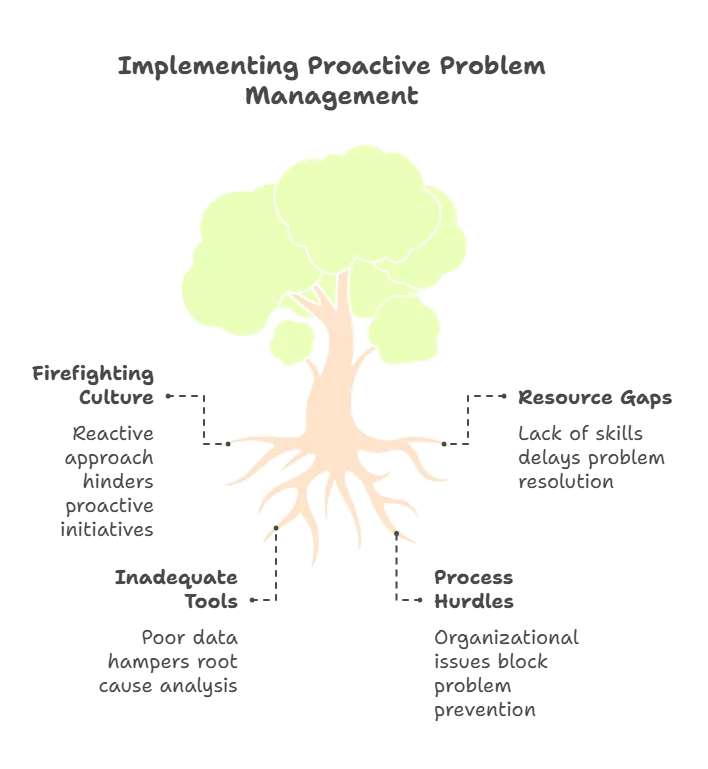
1. “Firefighting” culture and time pressure
Many teams are so busy reacting to daily incidents that they have little time to investigate deeper causes. When constantly fixing outages, tickets, and passwords, it’s also hard to step back and focus on prevention.
Ironically, the teams that need proactive measures the most are often too overloaded to put them in place.
2. Resource and skill gaps
Proactive IT problem management depends on skilled people who can analyze data, spot patterns, and push long-term fixes. Many organizations often struggle with a shortage of these experts.
The challenge increases when organizations haven’t defined ITIL problem management or when teams lack root cause analysis training. On top of that, when no one owns ITIL problem vs incident, progress often stalls.
3. Inadequate tools or data
Without proper monitoring, analytics, and a strong CMDB, spotting trends is like finding a needle in a haystack. Some teams collect plenty of incident data but lack a way to analyze it for patterns.
Broken processes or siloed data—like inconsistent logging or no knowledge base of known errors—make the problem worse.
Proactive management works best when supported by automation and analytics. For example, systems that flag recurring incidents or unusual error patterns automatically.
Process and organizational hurdles
Proactive problem management usually requires teamwork across different groups, since root causes can involve infrastructure or even vendors. It may also involve change management software to put fixes in place. But rigid silos and a “don’t touch it if it’s working” mindset often slow progress.
Leadership often favors quick, visible wins like restoring uptime over behind-the-scenes upgrades, preventing future outages. This also makes it harder to justify the time needed for proactive work.
Why it’s worth striving for
Despite the challenges, proactive problem management delivers huge value. The harder it feels to achieve, the more your team needs it—constant reaction signals deeper systemic issues. When done well, proactive and effective problem management cuts downtime and improves overall service quality.
By addressing issues at the root, you face fewer incidents in the long run. This also means less unplanned work for IT staff and a reliable experience for both users and customers.
How to start moving from reactive to proactive
So how can your team begin moving toward proactive problem management, despite the challenges?
The key is to start small and build momentum over time.
Here are some best practices to help you get closer to that goal—even if you can’t achieve it overnight:
Establish a dedicated problem management role
Start by designating a Problem Manager or forming a small IT problem management team. Their focus should be root cause analysis and long-term fixes, not day-to-day incident firefighting.
A dedicated role further ensures someone owns the task of investigating recurring issues without constant ticket distractions.
Make sure this role has the time, authority, and tools to dig deep into problems.
For example, many organizations hold a weekly Problem Review meeting to discuss top recurring incidents and assign actions. This further keeps problem-solving visible, structured, and accountable.
Accurately log and correlate incidents
You can’t spot trends if incidents aren’t logged consistently. Document every incident in your ITSM tool, including details such as time, affected service, symptoms, and resolution. Over time, this data becomes a goldmine for IT problem management.
Additionally, use tags or linking features to group related incidents. With a reliable incident history, you can run trend analysis to uncover patterns.
For example, do multiple incidents trace back to the same system or error? Do outages spike at certain times or after specific changes? Modern ITIL tools and analytics platforms can help highlight clusters of incidents that deserve deeper investigation.
Leverage monitoring and automation
Proactive IT problem management relies on strong monitoring of your infrastructure and applications. Moreover, use tools that send alerts for anomalies such as spikes in latency, error rates, or memory usage. Some advanced platforms use machine learning to predict incidents, such as forecasting capacity issues that may cause outages.
Automation also plays a big role. Moreover, routine checks, automatic responses to known issues, and event correlation can all reduce risks.
AIOps platforms (AI for IT operations) take this further by detecting patterns and surfacing problems before they impact users. By acting on early warning signs, you can often prevent a full-blown incident.
Integrate problem management with change management
Fixing a root cause often requires change—like deploying a patch, updating a configuration, or redesigning a process.
That’s why your change management best practices must work closely with IT problem management.
Plan changes carefully and use risk assessments or Change Advisory Boards to minimize disruption.
Cultivate a “continuous improvement” culture
- Learning from incidents: Encourage your IT team to treat every incident as a learning opportunity. Hold blameless post-mortems to uncover what failed, why it failed, and how to prevent it in the future. Moreover, recognize and reward team members who identify risks or suggest preventive measures.
- Proactive time investment: Spend a few hours weekly reviewing logs, updating documentation, training, or enhancing monitoring. Steady investments further reduce emergencies over time, and leadership should support them.
- Start small, build momentum: Becoming proactive doesn’t happen overnight. So, begin with small wins, such as tackling one recurring incident with a mini root-cause project. Each success builds momentum and strengthens management support for broader IT problem management.
- Making it a habit: ITIL experts stress that the best IT organizations make proactive problem management a habit. Altogether, the payoff is clear—greater stability, fewer disruptions, and happier users.
Every problem solved before it becomes an incident saves time, cost, and future headaches for both your team and your customers.
Leveraging tools and partners for better incident & problem management
Achieving strong incident and problem management takes more than process knowledge—you also need the right tools. Modern IT management software provides visibility, connects incident, change, and asset data, and automates parts of analysis.
Virima offers one such integrated solution. It combines IT asset management (ITAM), IT service management (ITSM), and IT operations management (ITOM) into a single platform. This unified approach makes it easier to manage incidents, uncover root causes, and keep services stable.
How a platform like Virima helps:
- Unified IT visibility: Virima’s solutions break down silos and provide a single view of your IT environment. The platform auto-discovers and maps critical resources and dependencies. Moreover, it shows real-time connections between applications, servers, and databases.
- Smarter incident & problem management: During outages, dependency mapping shows which components are affected and helps trace potential root causes. For IT problem management, recurring issues are easier to fix as maps reveal hidden common causes.
- Actionable reporting & analytics: Virima generates reports showing key trends, repeated incidents, or anomalies signaling emerging problems. This data-driven insight further makes it easier to prioritize fixes before they escalate.
- Proactive problem management: By combining incident records with configuration data—an ITIL-recommended practice—Virima helps identify major issues early. The platform also automates proactive analysis, transforming a difficult manual task into an achievable, streamlined process.
- Seamless ITAM, ITSM & ITOM integration: Virima links asset information with service desk tickets and monitoring tools. Software versions, locations, and ownership link to incident and problem records, creating a holistic view for faster resolution.
| Example: If a server repeatedly causes incidents, Virima shows its hardware, software, and dependencies all in one place. This speeds up diagnosis and reduces downtime. The platform supports knowledge management by documenting errors and workarounds, enabling agents to quickly apply proven fixes. Virima automates processes, alerting the right people during incidents and triggering remediation scripts. Automation speeds up response times, handles incidents consistently, and tracks problems accurately. |
Next steps
Adopting ITIL 4 incident communication and IT problem management transforms IT operations and service management —you don’t have to do it alone. The right tools and partners can accelerate your progress and make the shift from reactive to proactive much easier.
If your organization is ready to move beyond firefighting, consider ITIL-driven solutions like Virima. Virima discovers assets, maps dependencies, and predicts problems, showing proactive problem management in action.
By leveraging such a platform, your team can reduce outages and deliver more reliable, higher-quality IT services while aligning with core ITIL CMDB processes.
👉 Learn more: To see how Virima can support proactive problem management and strengthen your IT service management, schedule a personalized demo.
FAQs
1. What is the difference between an incident and a problem in ITIL 4?
An incident is an unexpected service interruption (like a system outage). A problem is the underlying cause of one or more incidents. Incidents need quick fixes, while problems need deeper investigation and long-term solutions.
2. Why should we separate incident management from IT problem management?
Because they have different goals. Incident management restores service fast, while problem management prevents the same issue from happening again. Mixing them up keeps teams stuck in “firefighting mode.”
3. Why is proactive problem management hard?
Teams are often too busy fixing daily issues, lack skilled people, or don’t have the right tools. This makes it tough to step back, analyze trends, and stop problems before they cause outages.
4. How can Virima help with incident and problem management?
Virima maps assets and connections, enabling faster root cause identification during outages. It also spots recurring issues, provides clear reports, and automates fixes—helping teams work smarter, not harder.
5. How can we start moving from reactive to proactive problem management?
Begin small. Log every incident, look for patterns, and assign someone to focus on root causes. Use monitoring tools, link fixes to change management, and build a culture of continuous improvement.