Auto discovery tool: Top 9 reasons to use one in 2025

Introduction
It’s 2 AM. Your dashboard flashes red—your main web app just went down.
As your team scrambles through alerts, you find the problem. A new device popped up on your network last week. No one tracked it. And now it has brought down a key system.
You think, “If only we had seen this sooner…”
Today, manual IT inventory is like using a flip phone—it doesn’t keep up.
Modern IT setups change fast. Virtual machines appear and often disappear. Cloud auto discovery tool grows and shrinks by the hour.
On top of that, your team uses personal devices that still connect to work systems. Some are allowed. Whereas others slip in quietly.
Here’s what’s happening now in 2025:
- Over 82% of companies support BYOD (bring your own device) programs. But sadly, 90% of lost or stolen BYOD devices cause a data breach.
- Also, the BYOD (Bring Your Own Device) security market is growing fast. In 2024, it was worth $119.8 billion. By 2033, experts expect it to reach $632.19 billion. That’s a 20.3% growth rate year over year.
These stats tell you two things. First, technology is spreading faster than ever. Second, IT infrastructure visibility into that tech has never mattered more.
Without real-time data, you’re just guessing. And guessing in IT can cost you.
That’s why an auto IT discovery tool is no longer optional—it’s a must. In other words, an automation discovery tool that runs continuously is now a must-have for IT operations.
In fact, many organizations now rely on Virima’s automation discovery tool to continuously map assets and dependencies.
It scans your setup 24/7. This also tracks hardware, software, and cloud based tools. Further, it alerts you about unknown devices, like that one from your 2 AM nightmare.
Editor’s note: This article was updated in August 2025 to include the latest insights on IT discovery automation tools.
| Auto discovery vs. automation discovery tool – Are they the same? Many IT professionals use the terms auto discovery tool and automation discovery tool interchangeably. Both describe solutions that automatically detect, catalog, and track IT assets without manual effort. While “auto discovery” is the more common phrasing, “automation discovery tool” emphasizes the automation-driven nature of the process. In practice, they mean the same thing — tools that streamline IT visibility, reduce risk, and save time. |
TL;DR: 9 reasons to use an automated IT discovery tool
Virima’s platform provides IT discovery automation features that simplify complex IT environments.
- Bring all your data together
You don’t need to update records manually anymore. Automated IT discovery tool finds your hardware, software, and services. - Make asset management easier
From buying to retiring assets, keep everything on track. You can track hardware, software, as well as licenses more accurately. - Stop errors caused by manual work
Manually tracking devices often leads to mistakes. It’s easy to miss BYOD tools or misplace records. In contrast, auto discovery tool catches everything on time and without errors. - Know what’s in your IT environment
No more guesswork or surprises. You can see every asset, connection, and configuration item (CI) clearly. - Automate scanning to save time
Manual audits are slow and often inaccurate. However, scheduled scans run automatically and find issues fast. - Cut your IT costs
Manual tracking often needs more staff and effort. But with the right tools like Virima, that changes. - Find and fix security issues quickly
Automated tools spot unsafe devices, open ports, and misconfigured settings. You can fix these before they become a problem. - Keep your CMDB up to date
You can connect automated discovery to your CMDB. It also fills in asset data and keeps it current. So, you always have one reliable source of truth. - Scan on schedule and act fast
Set regular scans to spot risks early. You don’t need to guess anymore. You’ll always know what needs attention—and fix it fast.
Compared to manual methods, adopting an IT discovery automation tool delivers faster, more accurate results and measurable ROI by reducing wasted effort, preventing outages, and maintaining compliance.
What is an auto discovery tool (and an automation discovery tool)?
Manual discovery methods can’t keep up with today’s fast-moving IT environments. That’s where auto discovery tool shines. Automated IT discovery uses special tools to find and record all your IT assets.
Moreover, these tools scan your environment to identify hardware, software, network devices, and cloud services. They keep your asset list updated at all times.
Instead of needing manual checks, the process runs quietly in the background. Plus, you don’t have to step in every time something changes. For instance, if someone adds a virtual server or connects a new laptop, the system finds it quickly. You’ll always know what you have, where it is, and who uses it—without wasting time on spreadsheets.
Here’s what an auto discovery tool brings to your table compared to manual discovery methods:
| Aspect | Manual IT discovery | Automated IT discovery |
| Speed | Slow and time-consuming | Fast and efficient |
| Data collection | Done manually, often incomplete | Automatically discovers and gathers complete data |
| Accuracy | Prone to human error | More accurate and consistent |
| Visibility | Limited visibility across the network | Offers full, up-to-date visibility |
| Scalability | Difficult to scale without more staff | Easily handles large or growing networks |
| Task handling | Repetitive tasks drain team’s time | Automates repetitive tasks and saves team effort |
| Updates | Must be done manually and often delayed | Runs on a schedule and captures real-time changes |
| Focus | The team spends time on basic discovery tasks | The team can focus on planning, analysis, and improvements |
| Suitability for large setups | Not practical for large, complex environments | Ideal for large companies with evolving IT landscapes |
What’s the difference between active and passive automated IT discovery?
When you need to track IT assets, understanding how auto discovery tool gathers data is key. They usually use two methods: active and passive. Each method plays a specific role in helping you identify devices in your network.
- Active discovery works by scanning the environment. It sends pings or login requests to devices to check if they’re online. This method further gives you a full, real-time picture of your assets during the scan.
It’s also ideal when you need to find all devices on your network quickly. But since it uses more resources, it’s better to run it during off-hours.
- Passive discovery listens to the traffic on your network. It doesn’t send pings or queries. Instead, it watches how devices communicate through things like ARP or DHCP requests.
It’s also non-intrusive, always running in the background, and won’t slow things down. However, it might miss devices that aren’t sending any data, often called silent devices.
Modern discovery tools usually use both. You might be wondering why that matters — it’s because this combined approach gives the best results. Passive discovery alerts you in real time, while active scanning ensures no device gets left out.
How does an automated IT discovery tool work?
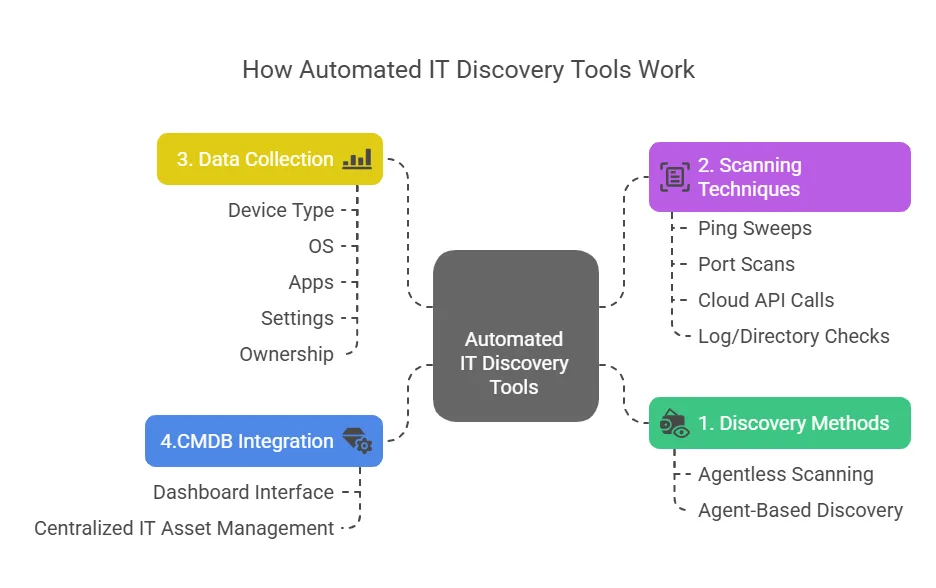
Diagram of an automation discovery tool scanning and mapping devices across an IT network.
Auto discovery tool scans your network to find assets and collects details about them. They use two main methods: agentless discovery and agent-based discovery.
- In agentless discovery, the tool checks devices over the network using protocols like SNMP or WMI. This method doesn’t need extra software on devices. Instead, it pings IP addresses and pulls system details remotely.
- In agent-based discovery, you install a small program on each device. That program then sends updates about the device back to the auto discovery tool. This method also gives you deeper insights, such as system status and configuration discovery.
Many network auto discovery tools use both methods to suit different needs. They can scan entire subnets or IP ranges and find all active devices. For example, the auto discovery tool might ping every address and log those that reply. Later, it checks those systems for more details.
You can also set custom scanning schedules. For instance, you might scan a network segment every night. The auto discovery tool will then discover both known and unknown assets automatically.
To make sure nothing is missed, a modern auto discovery tool combines many methods. Moreover, they do ping sweeps, port scans, cloud API calls, and even check logs or directories.
As each asset is found, the auto discovery tool gathers details like device type, operating system, apps, and network settings. Additionally, it may even show who the device belongs to. All this info goes into one system, usually a CMDB (configuration management database).
From there, IT teams can view and manage the data in one place. In short, these network auto discovery tools give you a full, live picture of your IT setup—without the headache of manual updates.
What to look for in automated IT discovery tools
When you explore IT asset discovery tools, you’ll find some features that most tools always offer. These features help you find, organize, and manage every device in your IT network.
Comprehensive asset coverage
A good auto discovery tool finds every asset in your environment. This includes servers, laptops, routers, and IoT devices. It also detects virtual machines, containers, cloud services, and installed software.
So, you get complete visibility across your data centers and cloud platforms. network auto discovery tools often support AWS, Azure, and other cloud providers without extra setup. Consequently, with everything in one place, your inventory stays accurate and up to date.
If you’re wondering how to find all devices on your network, look for tools that offer network-based scanning. Also, check if it supports protocols like SNMP, WMI, and SSH to automatically detect connected assets, without manual input.
Dependency mapping and relationship visualization
These tools do more than list assets. They show how everything connects in your IT environment.
For example, you can see which app runs on which server. You’ll also spot which systems depend on each other. This also makes it easier to plan updates and avoid problems.
If a server goes down, you’ll know what’s affected. These visual maps further simplify complex data and support smart decisions. That’s why they’re a valuable part of asset discovery.
Flexible discovery methods
Modern auto discovery tool offers different ways to scan your network. You can also use agent-based scans for deeper insights. Or you can try agentless discovery for a faster overview. Many automated IT discovery tools often support both active scans and passive monitoring.
Active scans check at set times. Passive monitoring watches for changes in real time. When used together, they help you spot every device and change. Moreover, this flexibility works well in both secure and fast-moving environments.
When choosing a auto discovery tool, consider how it fits your network infrastructure, compliance needs, and existing systems. Plus, look for customization options, scalability, and support for hybrid environments.
Integration with CMDB and IT systems
A discovery tool works best when it connects with your other IT systems. Most network auto discovery tools often link to your CMDB or asset management platform. This way, asset details update automatically—no manual steps needed.
You can use the data to support change management or respond to incidents. Many tools connect with platforms like ServiceNow, Jira ITSM, AWS, or Azure. So, the entire team—not just IT—can benefit from updated and accurate asset data.
Reporting and compliance tools
These tools often include ready-made reports. You can see total assets, license use, and software versions easily. As a result, this helps a lot during audits. You’ll know which devices need updates or are out of license.
Auto discovery tool also helps you meet rules like PCI or HIPAA. They show that you track all assets. Dashboards display real-time stats, like which devices pass security checks.
Additionally, you can even search quickly, like asking how many Windows 2012 servers you still use. Compared to manual tracking, this saves lots of time and effort.
IT teams often search for network auto discovery tools that eliminate blind spots, automate inventory updates, and reduce manual effort. Concerns often include hidden devices, missing real-time views, or poor security integration.
Security and risk management features
To stay secure, you must know what’s on your network. That’s why many auto discovery tool include security features. For example, they alert you if a new device connects without approval. They also track risky changes in device settings.
Some tools connect with security platforms to scan for threats. Others warn you when a server runs outdated software. These features further help your team fix issues quickly. You also reduce risk while spending less time on manual checks.
Each of these features helps you manage assets with more ease and accuracy. A smart discovery tool saves time, improves visibility, and supports your IT operations. So, choose one that fits your needs and connects well with your tools. With the right auto discovery tool, you’ll build a strong and reliable asset management foundation.
9 reasons why you need an automated IT discovery tool
If you’re tired of manual tracking or missing data, you’re not alone. That’s where auto discovery tool comes in. They automatically scan your network, detect connected devices, and update your asset inventory without any manual input.
1. Bring all your IT data together with automation
Your IT network keeps changing as new devices are added and old ones removed. Manual updates take time and often cause delays. This is why automated tools are now so popular. These automated IT discovery tools quickly detect changes in your environment, saving you time and effort.
You can use an auto discovery tool to find all your hardware, software, and network devices. It also helps identify network services like DNS, DHCP, and Active Directory. Moreover, it tells you who owns or uses each asset. Tools like Virima even let you create custom scans to uncover hidden assets across your network.
If you’re looking for one reliable source of truth, Virima gives you exactly that. It keeps your asset data accurate and up to date, even as things change.
See how easy it is to keep your asset inventory complete and accurate with Virima!
2. Streamline your processes and manage IT assets better
Automated discovery helps you find problems in your processes—like delays, duplicates, or gaps. Once you spot them, you can fix them and keep things running smoothly. This helps you stay in control of your IT operations.
- Lifecycle management
IT assets go through several stages like buying, using, and finally retiring. Tracking all these steps manually takes too long. A auto discovery tool further simplifies this and keeps everything on track.
- Inventory management
With real-time tracking, you always know what assets you have and who uses them. This prevents confusion and helps with quick decision-making.
- Compliance management
Managing licenses and following company policies is tough with hundreds of devices and tools. An auto discovery tool checks license use, expired software, and policy gaps. This also saves time and reduces mistakes.
In the end, automation helps you focus on what matters most. Your team can stop wasting time on manual tasks. Instead, they can improve your data and drive smart decisions using your CMDB.
3. Avoid errors due to manual IT asset audits
When you manage an IT department, even small mistakes can lead to big problems. For example, if you run a manual audit and find 51 devices and four servers, you might think you’re all set.
But what if you forgot to include BYOD devices? That means your service map is already wrong. These unknown devices could also be a security risk.
Such errors can slow down your service delivery. That affects people using devices at work or at home who need support. If you don’t fix the issue quickly, the delay further gets worse. It can even lead to a service outage or a security breach.
Here’s where network auto discovery tools can help. These tools can scan your network once or twice a day. They don’t need much input from your side.
With Virima’s auto discovery tool, you can schedule daily scans. After the scan, you can check the results, update missing details, and fix any errors in your network setup.
4. Remove the unknowns in your IT environment
Automated discovery tools help you find hidden devices, new dependencies, or inactive assets. This helps you see exactly what’s in your network at any time. It also points out risks, so you can act before they harm your business.
You can’t secure what you don’t know about, and this auto discovery tool ensures you don’t miss a thing. With better visibility, you can also track changes as they happen. So when something needs fixing, you can do it fast, without guessing or wasting time.
5. Automate discovery scans and save time on manual audits
Manually tracking hardware and software takes a lot of time. It often leads to mistakes and missing data. Even if your team works hard, human errors and missed updates still happen. This makes it tough to keep your automated asset inventory accurate.
You already know how important it is to track changes in your IT environment. But checking which devices are active can be slow and boring.
That’s where automated discovery comes in. It also scans your environment faster and with no mistakes. So, you save time and get a clearer view of your assets.
Example: A global enterprise implemented an automation discovery tool to schedule nightly network scans across multiple data centers. As a result, the organization saw a 30% reduction in missing assets within its CMDB.
Even more importantly, incident response times improved, because the IT team was immediately alerted whenever new or unauthorized devices came online. This scenario highlights how automating discovery not only saves time but also strengthens security and operational visibility.
6. Reduce IT maintenance and overhead costs
Managing IT assets can take a lot of time and money. But automated IT discovery tools make the job easier. They reduce the hours you spend tracking devices and help you stay focused on what really matters—staying compliant.
For example, if your company has around 30 employees, you might need two full-time staff to handle IT issues. That can cost you up to $200,000 each year, not including software licenses. Instead, with automated IT discovery tools, there’s less need for manual work. This helps you cut both time and costs spent on 24×7 network monitoring.
Virima’s asset management tools give you a clear view of your entire IT setup. You can track devices, services, and even who owns what. With features like custom statuses and IT asset tracking, managing your IT assets becomes much simpler. So, you stay in control of your costs and stop paying for tools you don’t use.
7. Detect and fix vulnerabilities in your network faster
Network issues can lead to major security problems. These problems often cause money loss and harm your company’s image. The best way to find such issues is by using auto discovery tool.
- You might face several types of network risks. For example, rogue devices—like unknown laptops or phones—can connect without permission. These mobile devices often use open ports and can secretly give hackers access to your system.
- Sometimes, open ports expose sensitive data. Even if no one uses that port actively, it can still be a weak spot. Hackers may sneak in through such gaps and steal or collect data without being noticed.
- Threats can also come from inside your organization. Some employees or harmful software may find and use these weak points. This kind of attack can damage your data, your money, and your reputation.
Now more than ever, you need to act fast. In fact, the 2025 Verizon DBIR found that unmanaged devices caused 46% of stolen-credential cases. Clearly, automating discovery is not a choice—it’s a must.
Automated IT discovery tools help you spot threats before they grow. They further scan your systems and find hidden devices or apps. Even during an attack, these auto discovery tools can show you where it started, so you can stop it quickly.
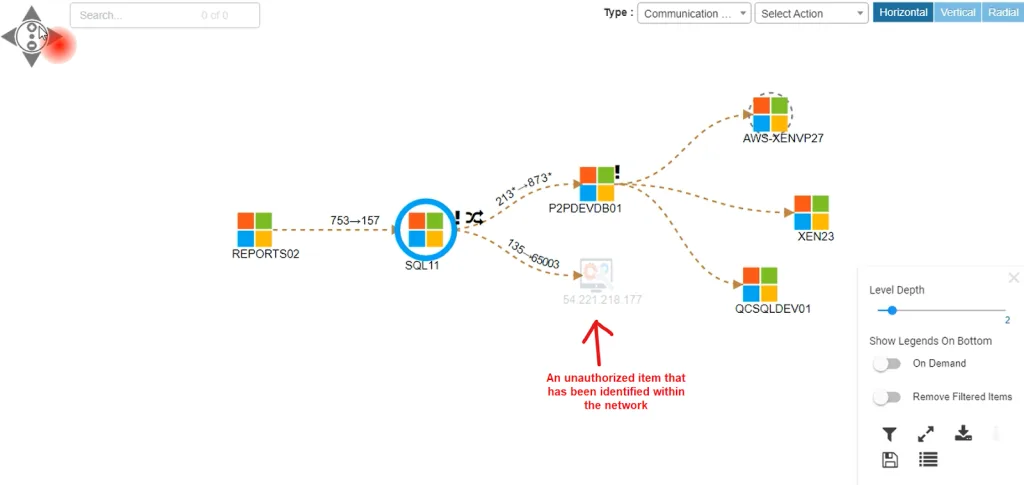
An example of an unauthorized device that was found in a discovery scan conducted by Virima
8. Keep your CMDB updated and current
To make your CMDB a true source of truth, it needs fresh data all the time. Manual updates are hard, especially in large companies. Your IT team may not have the time to run daily scans. That’s where automation helps.
With Virima’s IT Asset Discovery, you can scan your entire network without doing it manually. The auto discovery tool uses custom probes to find thousands of devices, both physical and virtual. These scans run in the background while you focus on your work.
It’s important to connect your auto discovery tool directly to your CMDB. This way, you don’t have to upload data yourself. The system pulls in the latest asset details and adds them to your CMDB. So, no matter what changes in your IT setup, your CMDB stays current.
9. Run automatic, pre-scheduled scans to save time
Knowing which devices you use is only the start. You also need to know where those devices are. That’s easy in a small office, but large environments hide a lot of assets. Tracking everything manually can take hours.
You might be wondering if automated discovery actually saves you time – it does. You can schedule scans to run at set times. The auto discovery tool checks your whole network and updates the CMDB for you. If it finds unknown devices, you can spot them fast and act right away.
Your IT assets, clearly mapped and managed with Virima
Managing IT assets can get overwhelming, especially when things keep changing. That’s why using automated discovery is a smart choice. It also helps you find every device, system, and app in your IT setup without manual effort. You can bring all your data together in one place, making it easier to track and manage everything.
Whether you call it an auto discovery tool or an automation discovery tool, the outcome is the same: faster, more accurate IT visibility through automation
Organizations that implement an automation discovery tool often see rapid ROI—not only in time savings, but also in reduced risk from unknown assets, fewer compliance violations, and smoother audits.
As a result, you save time and money while reducing manual work. Your team also becomes more organized and efficient. So, book a demo with Virima today. We’ll help you uncover your IT assets and simplify how you manage them.
A few common questions on auto discovery tools:
Q1. How can I keep the CMDB updated automatically?
To keep your CMDB updated, connect it with an auto discovery tool. These tools scan your network often or in real time. Then, they send the data straight into the CMDB. This way, you don’t have to enter anything manually.
Tools like Virima even let you set custom scans, so new or changed assets get added right away. That means your CMDB always shows the real picture of your IT setup. It also helps with service mapping, faster issue fixing, and safer changes.
Q2. What’s the difference between network discovery and asset discovery?
Network discovery software finds the devices on your network. It shows how they connect—like routers, IPs, and switches. You get a network map of what talks to what.
Asset discovery looks deeper into those devices. It collects details like software, hardware, settings, and users. In simple terms, network discovery shows the links. Asset discovery software shows the insides of each item.
Q3. Can discovery tools improve cybersecurity?
Yes, they can. auto discovery tools help you spot risks before attackers do. They find devices you don’t manage, catch setup issues, and highlight weak spots. These tools also watch for personal or hidden devices that connect without approval.
Because you can see everything in real time, your team can act faster. When you use them with security tools, you can fix problems based on how risky each device is.
Q4. What is the benefit of using auto discovery along with ITAM?
Auto discovery keeps your asset list correct and fresh. ITAM software helps you manage, track, and plan for each asset. When used together, they reduce errors and save time.
You also avoid buying too much or too little. Plus, you stay ready for audits and stay secure. This mix gives full control—both technically and financially.
Q5. How do I identify unknown devices on my network automatically?
Auto discovery tool uses SNMP, WMI, SSH, or APIs to scan your network. They find every device, even ones not in your system. Once found, they label them and check if they belong. Unknown or unsafe ones get flagged.
Some tools even watch network traffic to catch new devices as they show up. So, you’ll get alerts as soon as something new connects.