What is a configuration item in ITIL?

On March 1, 2024, Microsoft went dark. It was a massive outage.
Outlook, Teams, Exchange, and even Azure—all went down.
Tens of thousands of users are locked out. Businesses stalled—productivity frozen mid-click.
One glitch and there was a ripple across the entire Microsoft ecosystem.
And here’s the thing: figuring out what caused the outage questioned the ‘trust’ customers put into them. Eventually, it was all sorted, but the initial blame went to Crowdstrike, its cybersecurity vendor.
This is what happens when IT systems stretch across hundreds of servers, apps, and networks: one weak link, and the whole chain snaps.
Downtime isn’t just annoying. It’s expensive. Some studies put it at $9000 per minute. That’s a bleeding edge nobody wants to be on.
The problem? Most organizations can’t actually see all their moving parts.
Servers here. Databases there. Software licenses are floating somewhere in the middle. All siloed, all critical, none fully mapped.
This is why the CMDB configuration item comes in.
Track every component. See the dependencies. Know the blast radius before something fails.
In this guide, we’ll break down what CIs are, the different types, and the best practices to manage them, so your team can spend less time firefighting and more time running IT like a well-oiled machine.
What is a configuration item in ITIL?
A configuration item (CI) is any component or resource within an organization’s IT environment that needs to be controlled and managed to deliver services effectively. In ITIL configuration management, CIs are tracked not only for their existence but also for their relationships, dependencies, and impact on services.
CIs can include:
- Physical assets: servers, network devices, laptops
- Digital assets: applications, virtual machines, cloud services
- Documentation: policies, process diagrams, service-level agreements
- People: roles such as service owners, administrators, or specialists
- Facilities: data centers, network rooms, or other service-critical locations
Modern configuration management databases (CMDBs) store detailed information about configuration item and their interconnections. This allows IT teams to:
- Visualize how services are composed and interdependent
- Assess the impact of changes before implementation.
- Reduce downtime by improving incident and problem resolution.n
By maintaining accurate CI records within ITIL configuration management practices, organizations can make data-driven decisions, minimize service disruptions, and align IT operations with business outcomes.
Types of configuration items in CMDB
In a configuration management database (CMDB), a configuration item (CI) can be almost any component necessary to deliver and maintain IT services. To simplify understanding and management, configuration items are grouped into clear categories.
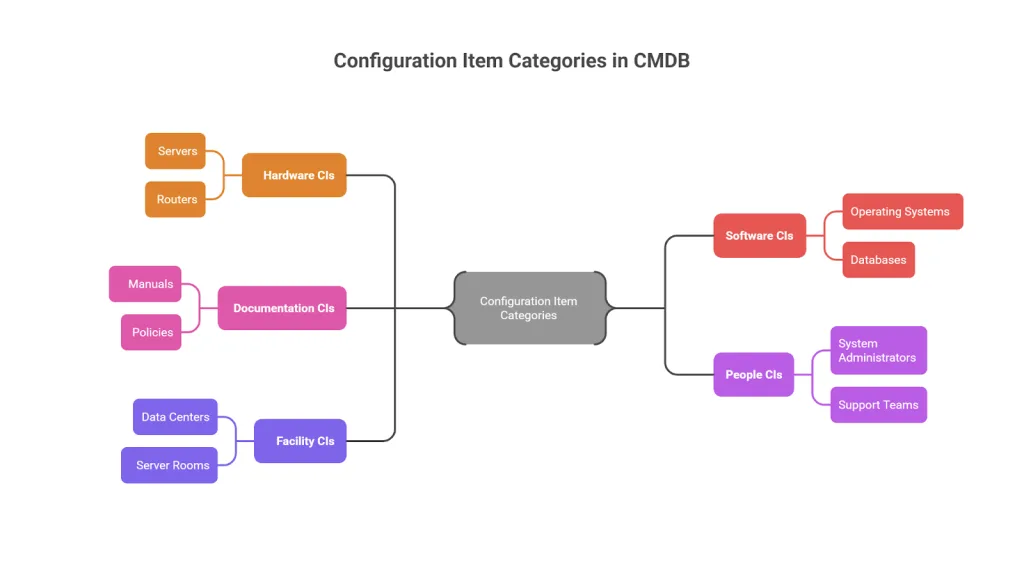
Configuration item categories in CMDB
- Hardware CIs
Hardware configuration items include all physical devices in your IT environment, such as servers, laptops, desktops, routers, storage systems, and network switches. These are tangible components that form the foundation of IT infrastructure.
- Software CIs
Software configuration items cover applications, operating systems, databases, middleware, and virtual machines, including those running in cloud environments. Tracking these ensures teams understand what software is deployed, where, and how it interacts with other components.
- Documentation CIs
Documentation configuration items include manuals, support guides, configuration diagrams, policies, and process documents. While intangible, they are critical for troubleshooting, compliance, audits, and maintaining operational consistency.
- People CIs
People CIs represent the roles, responsibilities, and relationships of individuals managing or using IT services, such as system administrators, service owners, and support teams. Including people ensures accountability and operational clarity.
- Facility CIs
Facility CIs include physical locations supporting IT operations, such as data centers, server rooms, or disaster recovery sites. These are tracked because they provide the environment in which IT services run.
By categorizing CIs this way, hardware, software, documentation, people, and facilities, organizations gain a complete, structured view of their IT environment, making it easier to manage dependencies, relationships, and service impacts.
Configuration item vs. IT asset – what’s the difference?
It’s common to confuse Configuration items (CIs) with IT assets, but they serve different purposes in IT management.
An IT asset is any hardware, software, or resource that has a financial value for the organization. Think of laptops, servers, software licenses, or even cloud subscriptions, anything you’ve purchased or pay for regularly. IT asset management focuses on costs, contracts, and asset lifecycle management.
A configuration item (CI), on the other hand, is about service delivery and operations. A configuration item could be an IT asset or something without direct financial value, such as documentation, a database connection, or a virtual service dependency, that impacts IT services.
Here’s the breakdown of key differences between configuration items and IT assets:
| Aspect | Configuration Item (CI) | IT Asset |
| Purpose | Service delivery & operational impact | Financial value & lifecycle management |
| Scope | Can include assets and non-asset items | Focuses only on owned/purchased items |
| Relationships | Tracks dependencies & service impact | Tracks cost, contracts, and ownership |
| Examples | Servers, firewalls, configs, documentation | Laptops, software licenses, cloud spend |
So, while some items are both assets and CIs, CIs focus on keeping services reliable, while assets focus on managing costs and ownership.
Why do we need configuration items in ITSM processes?
Configuration Items (CIs) are the building blocks of IT service management (ITSM).
From servers and cloud instances to business applications and even supporting documentation, CIs give IT teams complete visibility into the infrastructure powering business services.
But more than just an inventory, CIs form the backbone of incident resolution, change impact analysis, problem prevention, and compliance efforts.
When managed through a Configuration management database (CMDB), CIs help IT organizations transform raw IT data into actionable insights that directly affect business continuity, operational efficiency, and cost optimization.
Here’s a case study where Virima resolved a slow CMDB for a healthcare brand:
Reducing downtime during outages: incident management
Scenario:
HealthSure Hospitals relies on Electronic Health Record (EHR) systems to provide real-time patient information. One morning, the EHR system experiences severe slowness across multiple departments.
Impact assessment:
The IT team uses the CMDB to identify all dependent CIs—EHR application servers, database clusters, and network gateways. They quickly discover that the database cluster supporting multiple clinical systems is near capacity.
Resolution and documentation:
Using Virima, the team identified 12 servers supporting the application, far more than the four servers known to the vendor. Resources were reallocated quickly, and the CMDB was updated with incident and corrective actions.
Lessons learned:
By maintaining accurate CI relationships, HealthSure resolved the outage in under 45 minutes.
Virima Case Highlight:
- Automatic discovery of over 7,000 server configurations and 2,000 applications
- Mapping of 150+ enterprise services ensures teams always know the full scope of dependencies.
Configuration item (CI) lifecycle in ITIL 4
Managing configuration item lifecycle, as defined by ITIL configuration, ensures accurate records, better control, and efficient service delivery across ITSM processes like change enablement, incident response, and proactive problem management.
Planning and design
This stage begins with identifying the business need for a new CI. IT and business stakeholders decide what type of CI is required (e.g., server, application, database) and define its specifications, expected relationships, and compliance requirements.
By setting clear goals upfront, organizations avoid unnecessary complexity and ensure each CI adds real value to IT services.
Acquisition and procurement
Once requirements are defined, the CI is purchased, licensed, or developed according to the agreed design. This stage may involve vendor negotiations, cost approvals, and alignment with security or architectural standards to ensure the new CI fits within existing IT ecosystems.
Identification and registration
Every CI must be uniquely identified before entering the live environment. This includes:
- Assigning a unique CI ID
- Categorizing the CI type (hardware, software, documentation, people, facilities)
- Documenting attributes such as version, owner, location, and relationships in the CMDB
This ensures traceability and links the CI to incidents, changes, or service requests later in its lifecycle.
Testing and quality assurance
Before deployment, the CI is placed in a test or staging environment. IT teams validate whether the CI meets performance, security, and compliance requirements. This step prevents flawed configurations from entering production and reduces the risk of service disruptions.
Deployment to production
The CI is then moved into the production environment following change management approvals. Deployment includes documenting the go-live date, dependencies, and rollback plans in case issues arise after release.
Early life support (ELS)
During the initial post-deployment phase, the CI receives enhanced monitoring and support. This “hypercare” period helps IT teams quickly address unexpected issues and stabilize the CI’s performance before it moves into steady-state operations.
Production and operational management
The CI now operates as part of the organization’s live IT services. At this stage, IT teams handle:
- Monitoring performance and health metrics
- Applying patches and updates to keep it secure and compliant
- Recording incidents and changes linked to the CI for accurate impact analysis
Automation tools often help maintain accuracy here by detecting changes in real time.
Continuous review and optimization
Throughout its lifecycle, the CI undergoes periodic audits and reconciliations to ensure data accuracy and regulatory compliance. Outdated relationships or unauthorized changes are corrected to maintain CMDB reliability.
Retirement and disposal
Finally, when the CI becomes obsolete or is replaced, it moves into retirement. This involves:
- Safely removing sensitive data
- Redeploying or canceling software licenses
- Recycling or securely disposing of hardware.
- Updating the CMDB to reflect the CI’s removal and prevent “ghost” dependencies
Proper retirement ensures cost savings, compliance with data privacy regulations, and a cleaner IT environment.
CMDB relationship mapping
Clearly, in this hyper-complex IT ecosystem, no configuration item (CI) exists in isolation. Servers connect to applications, which rely on databases that might be hosted in multi-cloud environments. A single failure in one component can ripple across the entire service chain, causing outages, disrupting customers, and costing money.
Under ITIL configuration management, mapping relationships between CIs in your CMDB is super important. Here’s why:
- Service Impact Analysis: When a CI fails, dependency mapping instantly shows which applications, users, or business services are affected, helping IT leaders prioritize what to fix first.
- Root-Cause Analysis: By tracing issues back to the exact failing component, teams can reduce mean time to resolution (MTTR) instead of merely firefighting symptoms.
- Preventing Cascading Failures: By understanding how CIs connect, IT teams can plan changes or updates without accidentally breaking downstream services.
- Faster Incident Response: Visual maps allow even non-technical stakeholders to grasp the scope of an outage or planned change quickly.
Traditional CMDBs show data. Virima’s ViVID™ mapping turns that data into real-time, interactive visual maps. IT leaders can:
- See live relationships between servers, applications, networks, and cloud services.
- Perform impact simulations before approving changes.
- Instantly identify critical paths during outages to speed up recovery.
With ViVID™, you’re not just looking at a static database; you’re getting a living map of your entire IT ecosystem, enabling more intelligent, faster decision-making.
Best practices for managing configuration items (CIs)
Managing CIs effectively keeps your CMDB clean, accurate, and valuable. Here are some quick tips:
- Decide what to track: Focus on critical systems and services, not every minor component.
- Keep CI data consistent: Standardize fields like name, type, owner, and relationships for clarity.
- Use a CI lifecycle: Add new CIs, update details after changes, and safely retire unused ones.
- Automate discovery: Use tools to track CIs and dependencies in real time, reducing manual errors.
- Map relationships: Visualize dependencies for better impact analysis and faster troubleshooting.
- Assign ownership: Make teams or individuals accountable for CI accuracy.
- Audit regularly: Review data to maintain compliance and prevent issues.
- Integrate with ITSM: Leverage accurate CI data for incident, problem, and change management.
How to manage configuration items (CIs) on Virima
So, let’s see how Virima makes managing Configuration Items (CIs) simple. On Virima, all your CIs are organized and tracked through the CMDB with the help of automated discovery and integrations.
The first step is getting your CIs into the system. You can do this by running Virima Discovery scans across your network, deploying lightweight agents for remote devices, integrating with cloud platforms like AWS or Azure, or importing data using CSV templates.
Once your CIs are in place, Virima’s ViVID™ service mapping automatically connects the dots, showing how assets, applications, and services relate to each other. You can also add any missing links manually, making it easy to keep the big picture clear.
And that’s it, inside the CMDB, you’ll find all the details about your CIs along with visual maps that make change planning, impact analysis, and troubleshooting a whole lot simpler.
So, why wait? Book a demo today and see how Virima keeps your CIs organized, mapped, and ready for whatever comes next.
FAQs
Q1: What is the role of a configuration item (CI) in ITIL configuration management?
Answer: A configuration item (CI) is any component in your IT environment—hardware, software, documentation, people, or facilities—that must be tracked to deliver IT services reliably. In ITIL configuration management, CIs help maintain a clear view of dependencies, enabling informed decision-making for incident resolution, change management, and service continuity.
Q2: How can an accurate CMDB improve ITIL configuration management processes?
Answer: A well-maintained Configuration Management Database (CMDB) stores detailed CI information and its relationships. This visibility ensures faster incident response, accurate impact analysis for changes, and reduces the risk of service disruptions, helping IT teams align operations with ITIL best practices.
Q3: Which types of configuration items should be prioritized for tracking in ITIL best practices?
Answer: Critical CIs impacting service delivery should be prioritized. This typically includes key servers, applications, databases, network devices, business-critical documentation, and relevant personnel roles. Tracking these first ensures operational continuity and supports compliance.
Q4: How do configuration items support change management and incident resolution in ITIL?
Answer: CIs provide the backbone for understanding dependencies. Before implementing a change, teams can analyze affected CIs to prevent disruptions. During incidents, CI relationships help identify root causes quickly, reducing downtime and improving overall IT service reliability.
Q5: What tools or AI capabilities can help maintain up-to-date CI records across complex IT environments?
Answer: Modern ITAM/ITSM tools, like Virima, offer automated discovery, real-time dependency mapping, and AI-assisted updates for CI records. These features ensure that the CMDB reflects current infrastructure, software, and service relationships, enabling smarter ITIL-driven decisions.