ServiceNow Discovery vs Service Mapping: Key Differences (2026 Guide)

The ServiceNow Discovery vs Service Mapping question comes down to two different jobs. ServiceNow Discovery identifies what exists in your IT infrastructure — servers, VMs, cloud resources, network devices — and writes those records into the CMDB. Service Mapping reads that CMDB data to build dependency maps showing what those assets support and what breaks when they fail. One answers “what do we have?” The other answers “what does it impact?”
In 2026, the distinction carries new weight. IT teams deploying AI agents in ITSM and ITOM workflows need both layers: discovery-sourced CI accuracy so agents act on current data, and service dependency context so agents know what they might break. This guide covers what each tool does, where each capability ends, when you need both — and what ViVID™ service maps add on top of both.
What is the difference between ServiceNow Discovery and Service Mapping?
ServiceNow Discovery catalogs assets and writes CI records into the CMDB. Service Mapping builds dependency maps from that CI data so teams can see what a service runs on and what breaks if a CI fails. Discovery answers what exists. Service Mapping answers what it supports. Both sit in ITOM licensing, separate from ITSM.
ServiceNow Discovery vs Service Mapping at a glance
| Tool | What it does | What it can’t do | When you need both |
|---|---|---|---|
| ServiceNow Discovery | Identifies and catalogs IT assets — servers, software, network devices, VMs, and cloud resources — and populates them in the CMDB. | Does not show what depends on each asset, what breaks if it fails, or the blast radius of a proposed change. | You need Discovery first. Service Mapping cannot produce trustworthy maps without accurate discovery data feeding the CMDB. |
| ServiceNow Service Mapping | Reads CMDB data and builds dependency maps showing how infrastructure components support business services. | Shows topology only. Does not surface open incidents, pending changes, or vulnerabilities on the same canvas — and is only as accurate as the discovery data feeding it. | You need Service Mapping once Discovery data is clean. For agentic IT, you need both layers plus operational context — the gap ViVID™ closes. |
| See how discovery-sourced CI accuracy and dependency context become Trusted Runtime Truth agents and operators can act on. Explore Trusted Runtime Truth. |
ServiceNow Discovery vs Service Mapping: the core difference. ServiceNow Discovery scans your infrastructure and writes CI records into the CMDB. Service Mapping reads those CI records to build dependency maps showing which business services each asset supports. Discovery answers “what exists?” Service Mapping answers “what does it impact?” Both require separate ITOM licensing on top of ServiceNow ITSM.
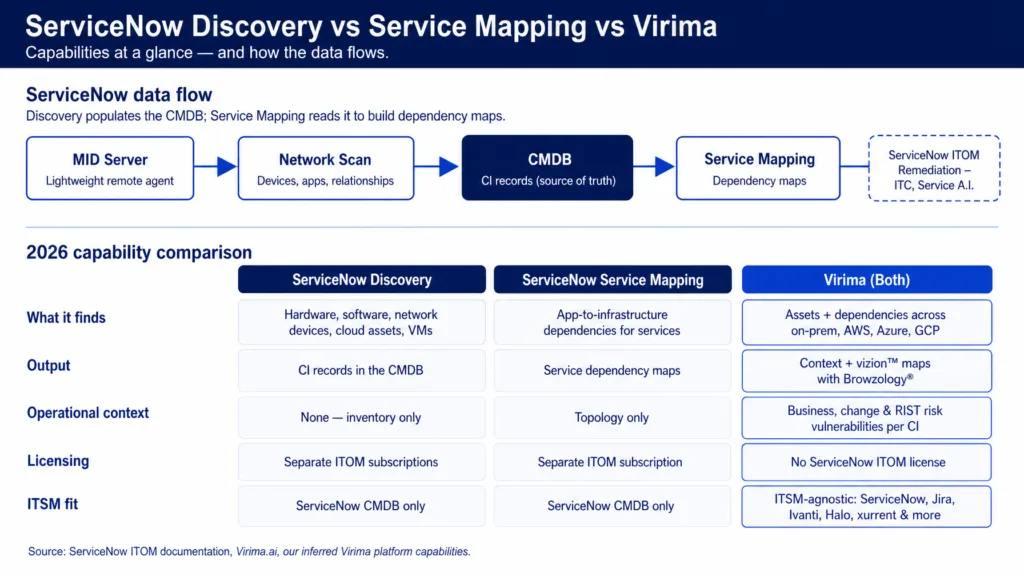
2026 capability comparison: ServiceNow Discovery vs Service Mapping vs Virima
| Capability | ServiceNow Discovery | ServiceNow Service Mapping | Virima (Both) |
|---|---|---|---|
| What it finds | Hardware, software, network devices, cloud assets, VMs | Application-to-infrastructure dependencies for defined business services | Assets and dependencies across on-prem, AWS, Azure via multi-source discovery |
| Output format | CI records in the ServiceNow CMDB | Service maps showing component relationships | CI records plus ViVID™ service maps with incident, change, and vulnerability overlays |
| Operational context | None — inventory only | Topology only — no incident, change, or vulnerability state on the map | Open incidents, recent and pending changes, and NIST NVD vulnerability overlays for Windows Server CIs, weighted by asset and service criticality |
| Licensing | Separate ITOM subscription, priced by CIs/nodes discovered | Separate ITOM subscription | Single platform, no ServiceNow ITOM license required |
| ITSM platform fit | ServiceNow CMDB only | ServiceNow CMDB only | ITSM-agnostic — feeds ServiceNow, Jira, Ivanti, Halo, Xurrent, Hornbill, TeamDynamix |
What ServiceNow Discovery does
ServiceNow Discovery identifies and catalogs IT assets and their relationships. It plays a central role in maintaining an accurate CMDB — the single source of truth for IT asset data and configuration records. In any ServiceNow Discovery vs Service Mapping conversation, Discovery is the foundation: without it, anything downstream that reads from the CMDB works with incomplete or stale data.
How ServiceNow Discovery works
- Preparation — Clean existing data and configure network settings before scanning begins.
- Scanning — The MID server (a lightweight Java agent installed within your network) scans for devices, applications, and their relationships without requiring inbound firewall rules.
- Classification — Discovered items are classified and organized in the CMDB based on predefined rules.
- CMDB update — Device attributes and relationships from each scan cycle are written to the CMDB.
- Ongoing monitoring — Discovery runs on configurable schedules to reflect ongoing infrastructure changes.
How ServiceNow Discovery works ServiceNow Discovery uses a MID server — a lightweight Java agent inside your network — to scan for devices, software, and cloud assets on a configurable schedule. Each scan classifies what it finds and writes those records into the CMDB. It does not require inbound firewall rules and supports multi-cloud environments including AWS and Azure.
Key capabilities
Discovery covers hardware, software, VMs, network devices, and cloud assets across on-premises and cloud environments. It includes distributed MID server support, pattern-based discovery for custom devices, and integration with the Identification and Reconciliation Engine (IRE) to reduce duplicate CI records. Multi-cloud coverage spans AWS and Azure, including containers and serverless technologies.
Where Discovery stops (and what still needs mapping)
Discovery tells you what exists. It does not tell you what breaks if a given asset fails, which services depend on it, or what the blast radius of a proposed change looks like. That requires ViVID™ service mapping
Cost compounds the limitation. ServiceNow Discovery is licensed separately from ITSM as part of the ITOM suite. ServiceNow now meters ITOM through subscription units tied to the number of configuration items discovered across categories such as servers, cloud resources, and containers, so cost scales with the size of the estate you scan — and rises further with MID server infrastructure, pattern development, and ongoing maintenance. Third-party licensing analyses commonly estimate ITOM Discovery in the range of $30K-$80K per year depending on scope (Redress Compliance, ServiceNow ITOM & Discovery licensing; ServiceNow ITOM/OT SU licensing docs).
ServiceNow Discovery populates the CMDB by scanning infrastructure to identify hardware, software, VMs, and cloud assets. It does not show which business services depend on those assets or what breaks when they fail. That context — the “what does it support?” question — belongs to ServiceNow Service Mapping, a separate module with separate ITOM licensing.
What ServiceNow Service Mapping does
ServiceNow Service Mapping helps IT teams understand how infrastructure components support business services. It answers a different question than Discovery: not “what assets exist?” but “what do those assets support, and what breaks if they fail?” ServiceNow documents Service Mapping as a module that identifies and maps business services to the servers, storage, and network devices that run and support them (ServiceNow Service Mapping docs).
Change managers rely on Service Mapping for blast radius analysis before approving a change. Incident responders use it to trace which service is affected by a CI failure. Security teams use it to assess which services are exposed when a vulnerability lands on a specific CI.
How Service Mapping works
- Top-down mapping — Starts from a defined service entry point and traces the infrastructure components supporting it. The most detailed approach; best for mission-critical services.
- Tag-based mapping — Builds maps from cloud resource tags. Faster to set up and scale, but trades some accuracy and does not reveal detailed component relationships.
- Intelligent traffic-based mapping — Uses machine learning to extract service-level relationships from network traffic data, filtering out irrelevant connections.
- Service mesh mapping — Targets cloud-native services using Istio-based architectures. Maps microservices and their connectivity.
- Dynamic CI groups — Maps services by shared attributes (location, cost center). Useful in dev/test environments.
ServiceNow’s own guidance is to map 70-80% of services quickly with tag-based and ML-based approaches, then reserve top-down mapping for the specific legacy applications that require it (ServiceNow Community: where to use each Service Mapping approach).
Service Mapping and CSDM alignment
ServiceNow’s Common Service Data Model (CSDM) is a standardized framework that defines services, service offerings, and their supporting applications across ServiceNow products, specifying where service data belongs in the CMDB (ServiceNow: What is CSDM).
Service Mapping maps directly to CSDM’s Service and Service Offering model — tying discovered infrastructure components to the business-level service definitions CSDM requires. Organizations aligning their ITOM investment to CSDM should treat Discovery as the CI foundation and Service Mapping as the layer that connects those CIs to CSDM’s service hierarchy. Teams that deploy Service Mapping without a CSDM alignment strategy typically produce maps that are technically accurate but operationally disconnected from how ITSM workflows classify service impact.
Where Service Mapping stops (topology vs operational context)
Service Mapping inherits the accuracy of the discovery data feeding it. A CMDB with duplicate CIs, misclassified devices, or sparse cloud coverage produces service maps engineers cannot rely on for change planning or incident triage. Organizations that stand up Service Mapping before establishing clean, continuously refreshed discovery data typically spend months in remediation before maps become operationally reliable.
The second limitation: Service Mapping shows topology. On the same canvas, it does not show which CIs have open incidents, which had recent or pending changes, and which carry known vulnerabilities. Operations teams jump between the service map, the incident queue, the change calendar, and a vulnerability tool to make a single decision during an outage. That gap is exactly what ViVID™ closes.
Can you use ServiceNow Service Mapping without Discovery?
ServiceNow Service Mapping can function without ServiceNow Discovery if CI data comes from another source — a third-party discovery tool, a Service Graph Connector, or manual imports. In practice, maps built on incomplete or stale CI data produce unreliable dependency views. ServiceNow recommends Discovery as the native data source, and the ITOM licensing structure means most organizations purchase both tools together.
This is one of the most common questions in the ServiceNow Discovery vs Service Mapping evaluation. The short answer: technically possible, operationally risky. Discovery must establish a clean CMDB before Service Mapping produces maps worth trusting.
Can you use ServiceNow Service Mapping without Discovery?
Technically yes if CI data comes from another source or manual import. In practice, maps built on incomplete or stale CMDB data are weak for change planning and incident triage. Most teams treat Discovery as the native foundation, or feed equivalent discovery-sourced CI accuracy from another platform.
The key differences between ServiceNow Discovery and Service Mapping
| Aspect | ServiceNow Discovery | ServiceNow Service Mapping |
|---|---|---|
| Purpose | Identifies and gathers data about devices and services | Maps dependencies of business services and their components |
| Focus | Physical and virtual devices — servers, network devices, cloud assets | Applications, services, and their underlying infrastructure |
| Primary question | “What exists in my environment?” | “What does this support, and what breaks if it fails?” |
| Output | CI records in the CMDB | Service dependency maps |
| Prerequisite | Clean network and credential configuration | Accurate Discovery data in the CMDB |
| Used by | CMDB and asset teams | Change, incident, and security teams |
| Licensing | ITOM subscription, separate from ITSM | ITOM subscription, separate from ITSM |
When you need both: the case for Discovery and Service Mapping together
Discovery finds what exists. Service Mapping shows what it impacts. You need both — and the sequence matters. This is the most important conclusion in the ServiceNow Discovery vs Service Mapping evaluation that teams miss when they treat the two as either/or options.
A CMDB full of CI records without relationship context answers “what assets do we have?” but not “what breaks if this asset fails?” For change management, incident triage, and blast radius analysis, relationship context is where operational value lives. And service maps built on incomplete or stale discovery data describe a hypothetical infrastructure — not the one you actually run.
What agentic IT requires from both layers
An AI agent acting on a CI needs two things: confirmation that the CI record is current (discovery), and knowledge of which downstream services and dependencies that action will affect (service mapping). An agent with only discovery data knows what it is touching but not what it will break. An agent with only service mapping data knows what it might break but cannot verify the underlying CIs are current. Safe agentic IT operations require both layers.
As organizations add AI agents to ITSM and ITOM workflows, the cost of missing either layer compounds. An agent acting on a stale CI can trigger unintended changes across dependent services. An agent without service dependency context cannot calculate blast radius before committing an action. Gartner predicts at least 15% of day-to-day work decisions will be made autonomously through agentic AI by 2028, up from 0% in 2024, and that over 40% of agentic AI projects will be canceled by the end of 2027 due to inadequate risk controls and unclear business value — both projections underscore why data quality and service context are foundational, not optional (Gartner press release, June 2025).
Get both layers without a ServiceNow ITOM license. Virima’s no-code ServiceNow integration delivers IT discovery, dependency mapping, and live operational context — all syncing into your ServiceNow CMDB through a bi-directional connection. No custom development. No ITOM licensing. See how it works.
When to stay on ServiceNow ITOM, and when another path fits better
Both tools are strong within the ServiceNow ecosystem. But they are not built for every IT environment — and the four scenarios below are where the stack starts to break down.
1. You need discovery and service mapping, but not a ServiceNow ELA
ServiceNow Discovery and Service Mapping are licensed through ITOM, separately from ITSM. For mid-market IT teams — or enterprise teams running lean — the combined ITOM licensing cost, MID server infrastructure, pattern development, and ongoing maintenance pushes total cost of ownership well past what the use case justifies.
ServiceNow Discovery and Service Mapping are licensed through the ITOM suite, separate from ITSM, with cost scaling by the number of configuration items discovered. Mid-market teams and organizations running non-ServiceNow ITSM platforms often find the combined ITOM licensing cost exceeds the operational value delivered. ITSM-agnostic discovery and service mapping platforms deliver the same operational outcomes without requiring a ServiceNow ELA.
2. Your CMDB data quality needs a stronger foundation first
If your CMDB already has duplicate CIs, misclassified devices, or sparse cloud and container coverage, Service Mapping inherits those problems. Teams in this position need a stronger discovery and reconciliation layer before CMDB service mapping is worth enabling.
3. You need service maps that show live operational state, not just topology
ServiceNow Service Mapping shows how components connect. On the same canvas, it does not show which CIs have open incidents, which had recent or pending changes, and which carry known vulnerabilities. Operations teams jump between four tools to make one decision during an outage. That is lost MTTR, not a visualization gap.
ViVID™ service mapping overlays open incidents, pending and recent changes, and NIST NVD vulnerability overlays on Windows Server CIs directly onto the dependency map at the CI level.
4. You run more than one ITSM platform
ServiceNow Discovery and Service Mapping are designed to feed the ServiceNow CMDB and serve ServiceNow workflows. If your organization runs HaloITSM, Ivanti, Jira Service Management, Xurrent, or a mix of ITSM platforms across business units, you are paying for deep integration you cannot fully use.
Choose your path: stay on ServiceNow, augment, or multi-ITSM
Stay on ServiceNow Discovery and Service Mapping if: ITOM licensing is already justified, MID servers and pattern maintenance are staffed, and ServiceNow is the only system of engagement for CMDB consumers.
Augment the ServiceNow CMDB with Virima if: you need higher-frequency multi-method discovery and ViVID™ maps after service definitions are provided, while keeping ServiceNow workflows and avoiding a separate ITOM purchase for those layers.
Choose multi-ITSM discovery and mapping if: ServiceNow is not the only ITSM, or you must feed the same discovery-sourced truth into ServiceNow, Jira Service Management, Ivanti, HaloITSM, Xurrent, and Hornbill through one integrations hub.
When does Virima fit next to ServiceNow Discovery and Service Mapping?
Virima fits when teams need multi-method discovery and ViVID™ maps after service definitions are provided, without buying ServiceNow ITOM for those layers, or when more than one ITSM must share the same discovery-sourced truth. Stay on native Discovery and Mapping when ITOM is already justified and the stack is ServiceNow-only.
Virima: discovery and service mapping in one platform
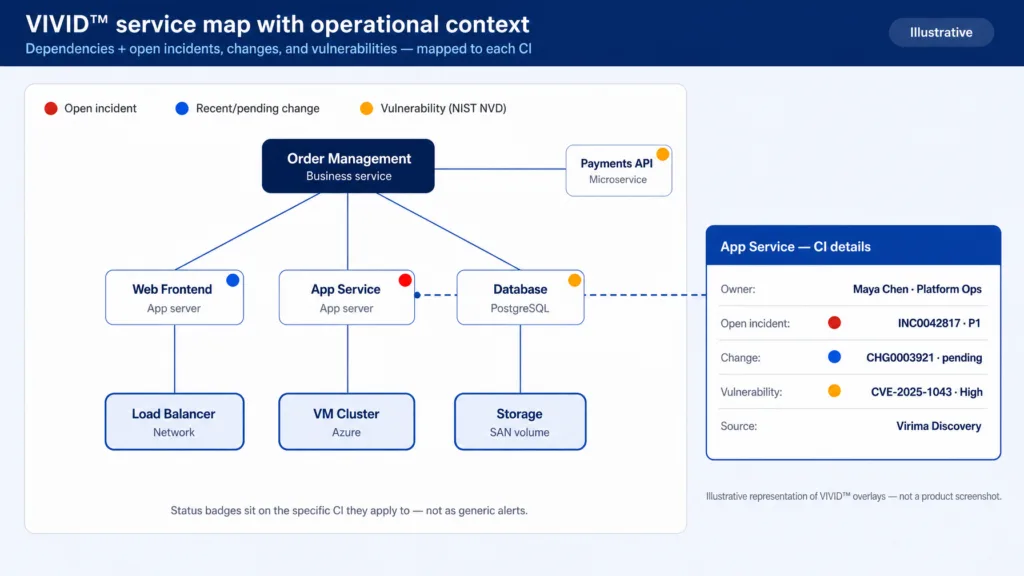
The image is illustrative and doesn’t depict how the map looks
Virima delivers the capabilities of both ServiceNow Discovery and ServiceNow Service Mapping — plus a live operational-context overlay on the map itself — in a single platform with a no-code ServiceNow integration.
For a closer look at how Virima and native ServiceNow Discovery differ, see Virima vs. native ServiceNow Discovery.
Multi-source hybrid IT discovery
Virima’s IT discovery covers hardware, software, and network components across on-premises, AWS, and Azure using agentless, agent-based, and API methods. High-frequency discovery cycles keep the CMDB current. The IRE eliminates duplicate CIs and reduces noise — which means the service maps built on top of that data are reliable without the months-long cleanup project that low-quality discovery data forces.
ViVID™ service maps with operational context (after service definitions)
Once service definitions are provided — manually, via spreadsheet import, or through integrations such as LeanIX — ViVID™ service mapping builds and maintains dependency maps from that input. ViVID™ does not infer service composition; that definition comes from your team or your enterprise architecture integration. What ViVID™ keeps current is the map itself, as infrastructure evolves.
ViVID™ overlays open incidents, recent and pending changes, and NIST NVD vulnerability overlays on Windows Server CIs directly onto the service map at the CI level. Change managers, incident responders, and security teams work from one view instead of four tools — the gap that ServiceNow Service Mapping leaves topology-only.
ITSM-agnostic by design
Virima feeds CI data, dependencies, and ViVID™ overlays into ServiceNow, Jira Service Management, Ivanti, Halo, Xurrent, Hornbill, and TeamDynamix through a no-code bi-directional sync. Pre-built blueprints map discovered data to ServiceNow tables, including custom objects, without custom development.
Every IT team that invests in ServiceNow deserves a CMDB that delivers trusted runtime truth — what exists, how it is connected, what changed, what will break, and who owns it. That is what Virima provides, whether you keep ServiceNow as your ITSM or layer Virima onto another platform.
See how multi-method discovery and ViVID™ maps after service definitions give change and agentic workflows dependency context without a separate ServiceNow ITOM purchase for those layers.
Frequently asked questions
What is the difference between ServiceNow Discovery and Service Mapping?
ServiceNow Discovery identifies and catalogs IT assets — hardware, software, VMs, network devices, and cloud resources — and populates those records in the CMDB. Service Mapping reads that CMDB data to build dependency maps showing how infrastructure components support business services. Discovery answers “what exists?” Service Mapping answers “what does it support, and what breaks if it fails?” Both require ITOM licensing separate from ServiceNow ITSM.
Does ServiceNow Discovery create service maps?
No. ServiceNow Discovery populates CI records in the CMDB. Service Mapping reads those CI records to build dependency maps. The two tools work together — Discovery provides the foundation, Service Mapping builds on it — but they are separate capabilities with separate ITOM licensing. This is one of the most common ServiceNow Discovery vs Service Mapping misconceptions.
Can you use ServiceNow Service Mapping without Discovery?
Technically yes, if CI data comes from an external source or manual import. In practice, maps built on incomplete or stale data are not reliable for change planning or incident triage. Most organizations purchase both tools together, and ServiceNow recommends Discovery as the native data source for Service Mapping.
How can Virima work alongside ServiceNow Discovery and Service Mapping?
Virima’s multi-source discovery builds a clean, low-noise CMDB foundation with fewer duplicate CIs and lower maintenance overhead. Once service definitions are provided, ViVID™ adds incident, change, and NIST NVD vulnerability context for Windows Server CIs directly onto the dependency map — operational state that topology-only service maps leave off the canvas. And Virima is ITSM-agnostic: the same data feeds platforms listed on the integrations hub, including ServiceNow, Jira Service Management, Ivanti, HaloITSM, Xurrent, and Hornbill.
Does Virima require a ServiceNow ITOM license?
No. Virima delivers IT discovery and ViVID™ service mapping in a single platform and can feed results into your ServiceNow CMDB through bi-directional integration without a ServiceNow ITOM subscription for those layers. That path fits teams that want discovery and mapping plus operational context without adding ITOM licensing, MID server infrastructure, and pattern maintenance to the bill.