Service desk vs. help desk: What is the difference?

IT teams love their acronyms and often use “help desk” and “service desk” like they’re the same thing. Potato, potahto, right?
Not quite.

While both offer user support, their roles, scope, and strategic impact differ significantly.
One is built for quick fixes and ticket juggling. The other is the backbone of strategic IT service delivery.
If you’re scaling fast, managing global teams, or just trying to stop tickets from falling into a black hole, understanding the difference isn’t just semantics—it’s the key to building a support system that actually works.
In this concise guide, you’ll identify notable differences between a Service Desk vs Help Desk, as well as how one supports the services of the other.
What is an IT help desk?
An IT help desk is your first line of defense when something breaks.
Typically, it’s the team users’ call when they need answers like how to reset a password, why their app crashed, or what to do when the printer won’t connect. If it’s common and fixable fast, the help desk handles it. If it’s common and fixable fast, the help desk handles it.
While service desks help, too. But help desks stick to the basics:
- Answer user questions
- Fix routine issues
- Route complex problems to the right team
Moreover, most help desks lean on a knowledge management, a central library of known problems, quick fixes, and how-tos. Think: internal Google for IT teams.
When problems go beyond Level 1, the help desk escalates the ticket to a Level 2 or 3 team, where specialists with deeper technical skills take over. This layered support model ensures fast responses for everyday issues while reserving expert time for more complex challenges.
Features of an IT help desk:
- Single point of contact: One place users go for IT help
- Ticketing system: Every issue gets logged, tracked, and resolved
- Knowledge base: A go-to for FAQs, fixes, and common workflows
- Automation: Ticket routing, status updates, and email notifications
- Basic incident/request handling: For things like “my laptop won’t boot.”
- Self-service options: Let users search, troubleshoot, and submit tickets on their own
What is IT service desk?
On the surface, IT service desk might look like just another help desk. Both give users a single point of contact. In addition to this, they both handle incidents. Both answers, well, help requests.
However, theservice desk doesn’t just respond it also manages.
According to ITIL 4, it’s “the point of communication between the service provider and its users.” Simple. But earlier ITIL definitions dig deeper. ITIL 2011 describes it as the team that not only handles incident response and service requests, but also owns communication and coordination throughout the process.
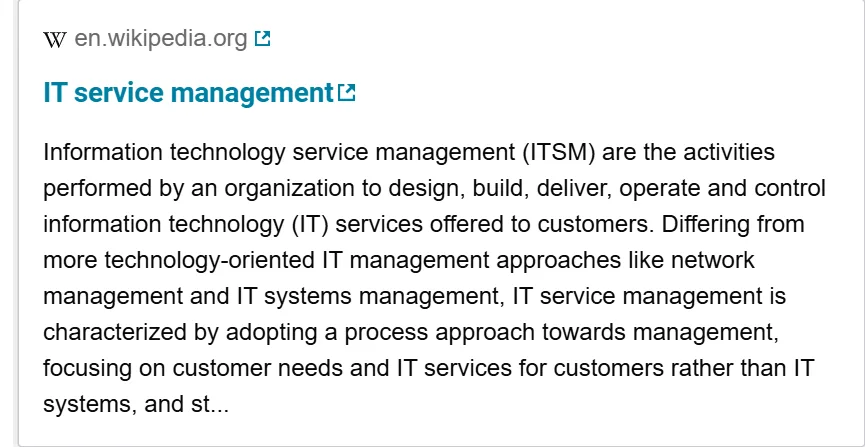
Source: Wikipedia
In a nutshell, it’s not just about resolving tickets—it’s about managing outcomes.
ITIL v3 vs. ITIL 4
Over time, the service desk didn’t always wear the crown in ITSM. In ITIL v2, it was barely more than a glorified help desk. ITIL v3 service desk gave it structure. But ITIL 4? It gave the service desk strategy.
Let’s break it down:
| 🔄 | ITIL v3 | ITIL 4 |
| Role of the service desk | Single point of contact for incident and request handling. Still seen as a function, not a strategic player. | Still the single point of contact—but now reframed as a practice within the service value system (SVS). Not just doing, but enabling outcomes. |
| Core focus | Incident and service request management, some user communication. | Incident and service request management, and some user communication. |
| Processes vs. Practices | Function-based model. Activities are siloed under roles and teams. | Shift to practices—cross-functional, outcome-driven activities that evolve with context. The ITIL V3 service desk is now part of the wider collaboration ecosystem. |
| Integration with business | Limited integration. Mostly supports IT. | Strong emphasis on aligning with business objectives, co-creating value, and improving service experiences. |
| Metrics | Focused on SLAs: response time, resolution time. | Value delivery through service relationships. The desk is a bridge between users and services, designed to drive experience, not just resolution. |
What does a service desk actually do?
Beyond the basics (resetting passwords, routing tickets), service desks handle:
- Service requests: New software, new user setups, device provisioning
- Incidents: Anything that disrupts IT services or degrades performance
- Change management: Ensuring smooth rollouts with minimal disruption
- Release management: Coordinating software releases and updates
- Configuration management: Tracking IT assets and how they interact
It’s designed to support both IT operations management and broader business workflows, something help desks don’t always touch.
Key features of a service desk:
- ITSM integration: Connects with incident, problem management, and change management
- SLA tracking: Monitors service delivery against performance benchmarks
- Self-service + service catalog: Empowers users while maintaining standards
- CMDB integration: Tracks infrastructure changes to prevent downstream chaos
- Supports business processes: Not just IT tickets, but systems that affect teams across the organization
Exhibit A:
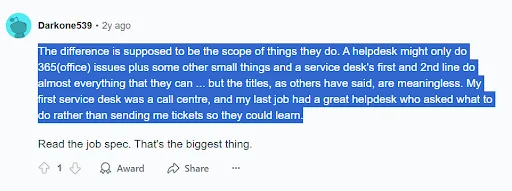
Source: Reddit
Also Read: Five Ways To Improve Major Incident Management
| Some user analogies we loved: “I don’t know anything about the technicalities, I’m just thinking if I walk into a building and there are two desks: IT service desk – This is where I might drop off my computer to get it servicedIT help desk – This is where I would go ask questions if I still had hope I could handle the issue with a little help” For me, it’s like the difference between a Personnel Department and a Human Resources Department. The first one makes me feel that I’m a person, the latter that I’m just a resource. ITIL V3 Service Desk just seems so impersonal to me. |
Service desk vs. help desk: differences you might miss
Service desk and help desk are two terms often used interchangeably. At first glance, they seem similar, but there are important distinctions.
Originally, the service desk was developed to expand upon the capabilities of a help desk while keeping its core value of customer service. It’s based on the concept of managing IT as a service.
The primary goal of a service desk is to provide high-quality customer service and support to end users and internal employees. To do this effectively, it must handle everything from simple software questions to complex technical issues.
On the other hand, a help desk supports an organization’s mission by providing technical support, but it focuses on fixing problems rather than encouraging user self-sufficiency.
Also read: Using data visualization to assess the impact of an incident, so you can resolve incidents quickly
The key difference is that a help desk takes a reactive approach, solving the specific problem at hand. In contrast, a service desk is more proactive, addressing a wide range of user needs, including requests for new services and information.
Historically, the help desk was an add-on to existing IT activities, stepping in when users needed immediate support. By comparison, the service desk software is an integrated part of an IT service delivery ecosystem, designed to ensure that once an issue is resolved, the fix is sustainable.
As a result, a help desk handles urgent requests, while a service desk uses tools and processes to predict and prevent issues before they arise.
Here’s a visible treat for you:
| Feature | Help Desk | Service Desk |
| Primary Focus | Quick fixes, incident resolution | End-to-end IT service management ITSM |
| Scope | A key part of digital transformation and IT strategy | Broader, strategic support aligned with business goals |
| Users Supported | End users | End users + IT teams + business stakeholders |
| Ticket Handling | Basic triage and routing | Full service lifecycle management, escalation, SLA tracking |
| Knowledge Base Use | Full service lifecycle management, escalation, and SLA tracking | Robust, integrated into ITSM processes |
| ITIL Alignment | Partially aligned with ITIL v3 | Fully aligned (especially with ITIL v4 principles) |
| Examples of Issues Handled | Password resets, printer issues, Office 365 help | Password resets, printer issues, and Office 365 help |
| Staff Skill Level | Tier 1 support | Tier 1 and Tier 2, sometimes Tier 3 |
| Automation & Self-Service | Basic ticketing and email alerts | System outages, access provisioning, and service requests |
| Strategic Role | Minimal | Key part of digital transformation and IT strategy |
Transitioning from help desk to service desk
So, how do you make the shift?
If you’re currently running a reactive help desk and want to mature into a proactive, ITIL-aligned service desk, here’s what the evolution typically looks like:
Step 1. Assess your current state
- First, check how many tickets are escalated unnecessarily.
- Are you tracking service level agreements, incidents, and service requests separately?
- Do you have a service catalog or knowledge base?
Step 2. Define services, not just issues
Once you’ve assessed your baseline, shift from “we fix problems” to “we deliver services.”
- Build a service catalog: what users can request, what you offer, what’s automated.
Step 3. Introduce ITIL-lite (without boiling the ocean)
- Start small with key ITIL processes: incident, service request fulfillment, and change management.
- Adopt the ITIL v4 mindset: value streams, not just process silos.
Step 4. Invest in the right tools
At this point, upgrade from basic ticketing systems to full ITSM platforms like ServiceNow, Jira Service Management, or Freshservice.
- Prioritize automation and self-service (chatbots, forms, workflows).
Step 5. Train your people
- Meanwhile, upskill Tier 1 agents into service coordinators.
- Build Tier 2 knowledge and coaching pathways internally.
Step 6. Track metrics that matter
- MTTR (mean time to resolution)
- First-contact resolution rate
- SLA adherence
- User satisfaction (CSAT)
Real-world use cases: help desk vs. service desk
To see the difference in practice, here are real-life IT scenarios and how each desk would typically handle them:
| Scenario | Help Desk | Service Desk |
| New Hire Onboarding | Creates email, grants basic system access | Coordinates full onboarding: email, devices, software licenses, VPN, policy walkthroughs — across departments |
| Password Reset | Provides an automated self-service option or integrates with SSO/password management system | Provides automated self-service option or integrates with SSO/password management system |
| Hardware Issue (e.g., broken laptop) | Logs the issue, forwards to IT support | Manages the request end-to-end: logs it, tracks asset status, coordinates pickup/delivery, and IT asset inventory management |
| Application Access Request | Submits a ticket, waits for IT to respond | Uses a structured request form routed with approvals + compliance checks (e.g., role-based access control) |
| Major Incident (e.g., server outage) | Not equipped; escalates manually | Follows incident management workflow, initiates comms, documents RCA, updates stakeholders |
| Software Installation | Offers a link or sends a manual install file | Uses pre-approved app catalog with automated deployment tied to user profile |
Still running a help desk? here’s your sign.
If you’re handling onboarding, app access, and asset escalations with a basic help desk, that’s like putting a band-aid on a broken process.
A help desk puts out fires.
In contrast, a service desk provides them with structure, accountability, and visibility.
So, if you’re scaling your IT operations, adopting ITIL, or are tired of ticket roulette, it’s time to level up.
Virima’s IT asset management helps you do exactly that — with automated discovery, ViVID service maps, incident workflows, configuration management database (CMDB) sync, and out-of-the-box ITIL alignment.
Because when you need more than break-fix support, you need a desk that truly serves.
Build a service desk foundation that grows with you.
Contact Virima as your partner in the shift.
FAQs
1. What is the main difference between a help desk and a service desk?
The key difference lies in scope.
A help desk focuses on resolving immediate technical issues, often related to end-user support (e.g., login problems, system errors).
A service desk covers a broader range of IT service management activities, including incident management, service requests, change coordination, and more often aligned with ITIL best practices.
2. Can a help desk evolve into a service desk?
Yes. Many organizations start with a help desk and later expand into a full-service desk as their IT needs grow.
This transition usually involves formalizing service workflows, adopting ITSM tools, and aligning with frameworks like ITIL to support more structured, scalable service delivery.
3. How do I decide which one is right for my organization?
It depends on your organization’s size, complexity, and IT goals.
- Help desks are often suitable for smaller teams needing basic support.
- Service desks are better suited for organizations that need integrated support, service catalog management, SLAs, and change or asset management.
Assess your current pain points and future needs to guide the decision.