How to create and maintain a reliable CMDB

It’s 10:17 a.m. The help desk is buzzing, the incident queue is lighting up, and an application critical to customer billing just went offline.
The root cause?
Someone updated a server. That server hosted a database. That database powered the billing API.
And no one knew because your configuration management database (CMDB) didn’t either–a gap your service desk and IT teams often struggle to bridge.
If this sounds familiar, you’re not alone. According to Gartner, 80% of CMDB projects fail to deliver value due to poor data quality and lack of process ownership. Yet, the organizations that get it right reduce mean time to resolve (MTTR) by up to 50%.
So, how do you build a CMDB that actually works? Let’s scratch the surface with basics.
What is CMDB?
A configuration management database (CMDB) is like your IT organization’s blueprint, a living map that shows every piece of technology you own and how it connects to everything else— the backbone of effective service management itsm practices.
The concept dates back to the early ITIL frameworks of the late ’80s, when organizations began realizing that just knowing what assets you have wasn’t enough. They needed to understand how those assets interact, how changes ripple through systems, and how a single server update could trigger an outage across the enterprise.
Modern CMDBs have evolved far beyond static spreadsheets. Today, they act as dynamic relationship engines, powered by automated discovery tools and visualization tools (like Virima’s ViVID™) that help IT teams see the invisible threads between applications, databases, users, and devices— maintaining assets and their relationships with clarity.
If you’ve ever wondered, “What happens if I take this database offline?” your CMDB is the one with the answer.
What is asset inventory?
An IT asset inventory is your digital stockroom. It lists what you own: laptops, routers, licenses, servers, maybe even coffee machines if IT bought them.
Its purpose is mostly financial and logistical — helping you track ownership, costs, depreciation, and warranties. It’s the “what” list:
- What assets exist?
- Who owns them?
- When do they expire or need renewal?
An inventory is about counting things. A CMDB is about connecting things and a CMDB enriched with accurate data becomes exponentially more valuable because it allows teams to resolve issues quickly and confidently.
CMDB vs. Asset inventory: The main differences
Here’s the differentiated table:
| Aspect | Asset Inventory | CMDB |
| Purpose | Tracks ownership, lifecycle, and cost | Maps relationships, dependencies, and change impact |
| Focus | Financial and contractual | Technical and operational |
| Example Question | “Do we still have five unused licenses?” | “If this server fails, what business service goes down?” |
| Use Cases | Budgeting, procurement, and audits | Incident, problem, and change enablement |
| Format | Spreadsheet or asset tool | Relationship-aware database, often visualized |
| Outcome | Accountability and compliance | Agility and risk reduction |
Step-by-step: Building a reliable CMDB
Think of this like assembling a high-precision jigsaw puzzle of your IT world—pieces include servers, apps, users, changes, and relationships. Skip a piece, and the result is still a picture, but blurry. Here’s how to make it sharp.
1. Define purpose & scope
Before you buy the tools or import data, ask: What problem are we solving? According to industry guides, effective CMDB projects begin when teams link the database to a specific business pain (for example: faster incident resolution or audit readiness).
Tip: Pick 1-2 use cases (e.g., “map our service dependencies for Change Enablement”) rather than trying to track everything on day one.
2. Identify configuration items (CIs)
Once the scope is set, determine which CIs matter first. These might be: servers, critical applications, network devices, etc. Then classify them (CI class, attributes, owner). Research shows that getting the data model right is key
Quote from Reddit wisdom:
“Just take it one step at a time… Query Active Directory or whatever for your computers, then… export it to Excel based on the arrays you created.” Reddit
Start simple and iterate.
3. Automate discovery & populate data
A CMDB fed manually becomes outdated quickly. Best practice: use CMDB discovery tools (network scans, cloud services, API pulls) + integrations (asset management, monitoring) to keep data fresh.
Actionable tip: Set your CI-data refresh window (e.g., every 24-48 hours) and identify what will always be automated vs what remains manual.
4. Establish governance, ownership & process
Ownership matters. Each CI (and each relationship between CIs) needs a steward, a responsibility, and a process for changes. Without that, data will decay.
Pro Tip: Create and publish a RACI chart: Role-who updates CI? Who approves? Who audits? Also, define the workflow:
“New CI discovered → assign owner → validate → relate to service”.
5. Visualize relationships & map dependencies
The power of a CMDB is seeing how things are connected. “Server A hosts App B, which depends on Database C” provides you with impact insight. Several guides call this mapping dependencies the “killer app” of CMDBs.
Practical step: Using your tool of choice, draw a simple map of one business service end-to-end. That alone often surfaces missing data and hidden risks.
6. Integrate with ITSM & other systems
A CMDB must play with your other tools: incident tickets, change processes, and monitoring dashboards. If these management processes are disconnected, value drops dramatically. Guide research emphasises integration as a must.
Tip: Build a proof of integration: when a change record is created, the corresponding CI is flagged, and the CMDB shows the impacted relationships.
7. Validate, audit & continuously improve
This isn’t a one-and-done task. Your CMDB is living. Regular reviews, health metrics (accuracy %, completeness %, orphan CIs %) help you monitor its state. Best practice sources recommend monthly or quarterly checks.
Here’s the checklist to follow:
- Are there CIs with no relationships?
- Are key attributes filled in?
- Was each CI updated in the last X days?
- Are owners still valid?
Each of these steps builds on the last. Skip governance and you’ll populate data but lose trust. Skip visualization and you’ll have a list, not a map. Follow all, and you’ll turn your CMDB from “just another database” into a strategic tool
Maintenance challenges & common pitfalls
Because your CMDB doesn’t fall apart overnight — it decays quietly.
Even the best-built CMDB can lose its shine if left unattended. Over time, data goes stale, processes slip, and ownership fades. What was once a clean source of truth slowly becomes a source of confusion.
Let’s explore the common traps IT teams fall into — and how to dodge them before your CMDB turns into a “Could-Maybe-Don’t-Believe” database.
1. The “stale data” time bomb
The most common way a CMDB loses credibility is through time. Cloud environments change hourly, but manual updates happen monthly — if at all. When servers are retired, IPs reassigned, or new SaaS apps appear, those changes rarely make it into the database fast enough.
As data goes stale, impact analysis becomes fiction. Teams approve risky changes based on outdated maps, leading to outages or failed audits that seem to “come out of nowhere.”
Quick fix:
Set a freshness threshold — for example, every CI must be reviewed or auto-updated within 30 days. Automate discovery wherever possible and treat manual edits as exceptions. A CMDB that updates itself daily never loses trust.
2. Lack of ownership & governance
Many CMDBs die not from bad data but from no one owning the data. Everyone assumes “someone else” maintains it, until no one does.
Without clear roles, configuration records drift, relationships break, and the CMDB stops being a source of truth. Governance isn’t an add-on; it’s the spine that keeps your CMDB upright.
Without ownership, accountability vanishes and so does data integrity. Create a RACI chart for CMDB governance. Assign a CI owner, an approver, and an auditor per service. Add ownership fields directly inside the CMDB tool to make accountability visible.
3. Over-scoping & “everything-in” syndrome
The fastest route to failure is ambition. Teams often start by saying, “Let’s track everything!” and end up tracking nothing well.
When your CMDB balloons to include every laptop, router, and coffee-machine sensor, accuracy plummets. The complexity overwhelms your update cadence, and users quietly stop trusting it.
It’s suggested to start lean. Focus first on business-critical systems — production servers, core applications, and the services that generate revenue or ensure compliance. Prove value, then expand in phases.
4. Disconnected tools & poor integration
A CMDB that doesn’t talk to its neighbors will quickly lose the plot. Incident, change, asset, and monitoring systems constantly create new data; if those updates don’t flow in automatically, your CMDB drifts out of sync.
When integrations break, relationships disappear, and suddenly your “single source of truth” becomes one of many half-truths. The irony? The tool meant to unify your IT view ends up being just another silo.
What to do:
Map every system that creates or consumes configuration data — ITSM, cloud, monitoring, discovery and prioritize real-time, bidirectional integrations. If it isn’t syncing, it’s aging.
5. Culture & adoption issues
Even with perfect tools, you’ll struggle if the team doesn’t buy in.
- Many CMDB projects derail because users see them as “extra work” or “bureaucracy” rather than value-add.
- Tools alone don’t fix this: you need Virima’s change management, training, and visible wins.
If no one uses the CMDB to guide decisions, then building it becomes an exercise in vanity rather than practicality. Trust drops; usage falls; results vanish.
The fix is to launch a “quick win” and use the CMDB to answer a real incident or change question, publish the results, and share the value across teams. That builds momentum.

CMDB maintenance checklist
Success factors: Turning your CMDB into a strategic asset
Most IT leaders agree on one thing: setting up a CMDB is easy; keeping it valuable is the real challenge.
A reliable CMDB isn’t about how many CIs you’ve imported; it’s about how intelligently it aligns with your business, how deeply it’s embedded into change processes, how continuously it’s measured, and how well your teams sustain it.
Here’s what separates a CMDB that sits idle from one that becomes your operational backbone.
1. Align CMDB goals with business outcomes — not IT hygiene
Let’s be honest: “data accuracy” doesn’t excite leadership. But “reducing downtime by 40%” or “cutting audit prep from three weeks to three hours”? That gets attention.
The most successful CMDBs start with business-aligned intent. Instead of building a database for compliance, they build it for outcomes:
- Fewer failed changes
- Faster incident resolution
- Clearer service ownership
A senior ITSM consultant on LinkedIn summarized it perfectly:
“If your CMDB doesn’t help the business make faster, safer decisions, it’s just an expensive inventory.”
One enterprise bank, for example, tied its CMDB KPIs to change success rate and incident MTTR (Mean Time to Resolve). Within six months, MTTR dropped by 38% — not because they added more CIs, but because every dependency was mapped to a service that mattered to revenue.
How to measure it:
- Identify 2–3 key business metrics your CMDB should influence (MTTR, failed change %, audit closure time).
- Track the “CMDB usage rate” — how often incident or change tickets link to a CI.
- Correlate improvements directly with your CMDB adoption curve.
Pro tip: The goal of your CMDB is not to manage everything; it’s to make every decision safer.
2. Implement change enablement controls that mirror reality
Every change, big or small, must flow through your CMDB — otherwise, it will drift from reality within weeks.
The missing link in most CMDBs isn’t discovery; it’s discipline. Engineers deploy new instances or patch servers without corresponding CI updates, leaving the CMDB stranded in last month’s state.
A ServiceNow implementation lead on LinkedIn shared a wake-up moment:
“We discovered that 70% of our change tickets didn’t update CIs. Once we built automation into change workflows, our accuracy jumped from 56% to 94% in one quarter.”
That’s the secret: your CMDB should listen to your ITSM tools. When a change is approved, it updates automatically. When an incident occurs, it pulls live dependency maps, not outdated snapshots.
How to measure it:
- Track change-to-update ratio (the % of change records that update CIs).
- Audit configuration drift monthly; any unlinked configuration change is a red flag.
- Use automated discovery for continuous reconciliation.
3. Regularly analyze CMDB health
If your CMDB isn’t being measured, it’s decaying.
The healthiest CMDBs are treated like products — they have KPIs, scorecards, and reviews.
It’s recommended to track three primary health dimensions:
- Completeness: Are all required CI attributes filled in?
- Correctness: Are the relationships valid and data current?
- Compliance: Does it follow standards, naming conventions, and audit rules?
But beyond tool metrics, practitioners in the ITSM community have evolved this further:
“We built a CMDB Health Index combining completeness, staleness, and business linkage. If a CI isn’t tied to a business service, it doesn’t count.” — IT Operations Director, via ITIL Community Forum
This modern approach ensures that your CMDB reflects business truth, not just technical accuracy.
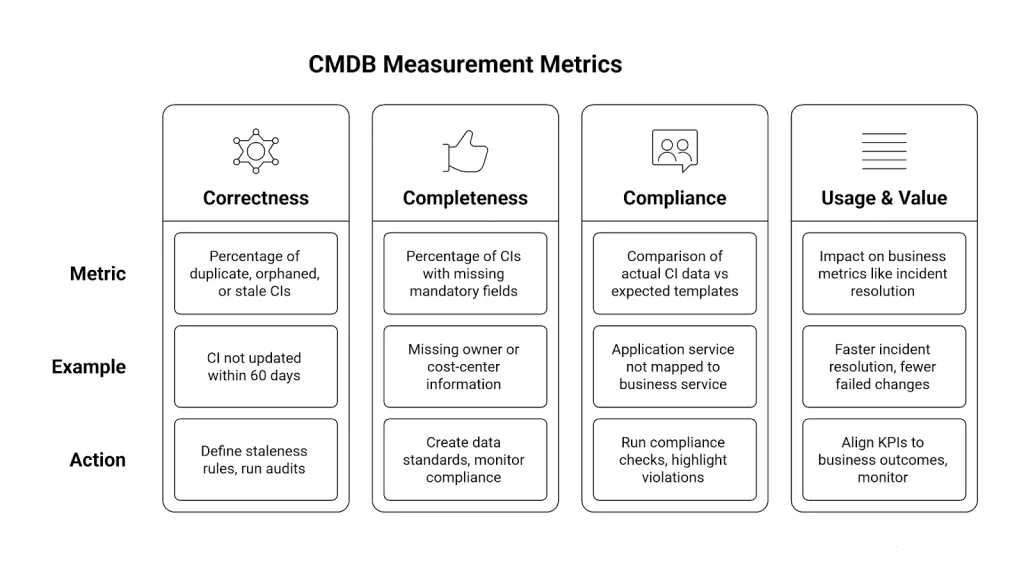
CMDB measurement metrics
How to measure it:
- Use dashboards to track key metrics:
- Completeness % (required fields populated) — aim for > 90%.
- Stale CI % (not updated in 30+ days) — keep < 10%.
- Relationship depth (average connections per CI) — higher means better dependency mapping.
- Completeness % (required fields populated) — aim for > 90%.
- Set thresholds and alert owners when metrics dip below targets.
- Review CMDB health monthly with data stewards and process owners — not just IT admins.
4. Train and empower teams
Tools don’t keep CMDBs alive, people do.
Even with AI-driven discovery, you need humans to verify relationships, approve changes, and use insights to solve problems.
The reality? Many teams see CMDB updates as “extra work.” The key is flipping that perception.
An ITSM coach in a community put it best:
“When engineers saw how the CMDB reduced outage investigation from two hours to fifteen minutes, we didn’t need to enforce updates — they wanted to contribute.”
Training isn’t about teaching people where to click. It’s about showing them why it matters.
Run short “CMDB Wins” sessions showcasing how it solved real incidents, enabled compliance audits, or revealed hidden dependencies.
How to measure it:
- Survey team confidence quarterly: “Do you trust CMDB data in daily work?”
- Track CMDB adoption through ticket linkage (number of incidents or changes referencing CIs).
- Reward data ownership and make CMDB accuracy part of service owners’ performance KPIs.
The future of CMDB: automation, AI, and hybrid IT
If the CMDB of the 2010s was a static list of servers, the CMDB of 2025 is an AI-powered knowledge graph, alive, self-updating, and context-aware.
Instead of waiting for humans to type in changes, it listens to your infrastructure in real time, learning from discovery tools, observability feeds, and change events across cloud, SaaS, and on-prem systems.
And it’s not just hype, it’s where the market is heading.
A market in acceleration
Recent reports show a global shift toward smarter, automated CMDBs.
According to multiple market analyses:
- The CMDB software market was valued at roughly USD 2 billion in 2025, projected to reach USD 6–7 billion by 2033, with a 13–15% CAGR across vendors like ServiceNow, BMC, and Virima. (Source )
GrowthMarketReports, GlobalGrowthInsights) - Around 58% of new CMDB deployments are now cloud-based, reflecting the hybrid IT reality. ( Source)
- Nearly half of large IT organizations (46%) already use automation-augmented CMDBs that sync through APIs or discovery tools — no manual updates required.
(GlobalGrowthInsights)
From database to brain
Modern CMDBs have evolved into decision engines that connect everything: users, assets, applications, and dependencies.
AI and automation turn configuration data into actionable intelligence:
- Real-time discovery updates CIs instantly as they appear or vanish.
- Observability data links performance metrics directly to infrastructure components.
- Change events automatically update records without manual intervention.
This means your CMDB no longer just tells you what you have; it predicts what will happen next.
Predictive impact analysis
Change management used to be reactive; something broke, and engineers figured out why.
Now, CMDBs with embedded machine learning models simulate impact before a change even happens.
An AI-driven CMDB can forecast the “blast radius” of a new deployment or patch, showing which dependent systems are most at risk.
Think of it as the weather radar for IT. Visualizing where the next storm might hit so you can prepare before it lands.
Self-healing integrations
Hybrid IT is chaotic by nature. Containers spin up and down in seconds, APIs evolve weekly, and cloud resources change daily.
AI-driven CMDBs are combating this volatility with self-healing integrations — automated syncs that detect and correct drift.
- When an AWS instance terminates, its CI disappears automatically.
- When a new Kubernetes node appears, it’s mapped instantly.
- When a service relationship breaks, the CMDB flags it for review.
This shift means governance isn’t reactive maintenance — it’s continuous validation.
The result? A CMDB that never drifts too far from the truth.
Cross-platform visualization
With 58% of CMDB deployments now running in cloud or hybrid environments, visibility is everything.
The new generation of visualization tools turns tangled IT topologies into interactive, panoramic maps.
Imagine selecting a single CI, say, Payments API, and watching its dependencies unfold across AWS, Azure, and on-prem databases. No spreadsheets. No guesswork. Just a unified view of how your digital ecosystem actually works.
Virima’s vision: A self-maintaining CMDB
Virima’s approach mirrors where the market is headed toward self-maintaining, self-validating CMDBs
.
Using AI-assisted discovery and ViVID™ visualizations, Virima bridges ITIL4 processes with real-time automation, creating a living configuration graph that’s continuously aligned with operational reality.
No more stale data, no more manual updates. Just a system that sees, understands, and responds automatically — the way modern IT should.
The bottom line
Between automation, AI, and hybrid visibility, the CMDB is evolving from a back-office record into a real-time intelligence platform.
It no longer just documents the infrastructure; it understands it, predicts it, and optimizes it.
By 2030, every mature IT organization will rely on a CMDB that updates itself — a digital mirror of the enterprise that learns and adapts in real time.
The CMDB’s future isn’t about data entry.
It’s about data awareness — and it’s already here.
FAQs
- How often should CMDB data be updated?
Continuously. In 2025, automated discovery every 24–48 hours is standard, with event-driven updates for real-time changes.
- What’s the ROI of a CMDB?
Organizations that integrate automation and AI report 30–50% operational efficiency gains, primarily through reduced incident time, fewer failed changes, and improved compliance posture.
- Is the CMDB still relevant in cloud-native environments?
More than ever. As IT becomes fluid and containerized, the CMDB evolves into an AI-driven system of relationships, keeping hybrid and multi-cloud environments coherent, measurable, and secure.