Change Management Database: How a CMDB Reduces Risk

Introduction
A change management database is usually your Configuration Management Database (CMDB). It gives teams clear information to plan and approve changes safely. It shows what assets you have, how they connect, and how a change may affect them. This visibility reduces risks and supports better informed decisions.
A CMDB for change management stores organized data about hardware, software, services, users, and how they relate. Because of this, it becomes the single source of truth for your IT environment. With a clean and accurate view, teams can spot potential issues early , improve quality data and understand the potential impacts of change in a reliable and real time way.
TL;DR
- A change management database helps IT teams plan changes with less risk. It maps IT dependencies, shows impact, and improves approvals.
- A CMDB for change management reduces failures and speeds up review cycles by helping teams quickly identify where a change could break services.
- Virima strengthens this with automated discovery and simple visual maps that keep cmdb data accurate and audit-ready.
Why a change management database matters
Modern IT systems are complex and connected. A small change can create big problems. A change management database helps teams avoid issues by giving them accurate, current data and ensuring data stays consistent across teams and tools.
A CMDB helps you:
- See all assets in one place for stronger asset management itam
- Understand system dependencies
- Plan changes with clarity
- Reduce outages
- Support audits and IT regulatory compliance with strong audit trails
With a CMDB for change management, changes become easier to plan and control and they align tightly with itsm processes across the organization.

How a CMDB supports every stage of change
A CMDB strengthens each step of the change lifecycle and connects smoothly to broader management systems.

1. Change request
- Shows which assets are involved and includes configuration items CIS
- Confirms ownership.
- Ensures all needed details are included.
2. Impact assessment
- Maps dependencies.
- Highlights risks.
- Shows service impact.
3. Approval (CAB)
- Gives CAB members clear data.
- Shows change history.
- Flags conflicts or blackout windows.
4. Implementation
- Identifies items that must be updated together.
- Keeps baselines stable.
- Warns teams about dependency risks.
5. Review and closure
- Supports post-change reviews.
- Confirms updates match the plan.
- Creates audit-ready records.
This forms the base of effective CMDB change management.
12 ways a CMDB supports change management
A change management database improves safety, clarity, and control.
| Capability | What it does | How it helps change management |
| Change impact analysis | Shows which systems, users, and services are affected. | Helps teams understand risk before approving a change. |
| Blast-radius mapping | Reveals upstream and downstream dependencies. | Prevents surprise outages by showing hidden links. |
| Risk scoring | Rates each change based on CI criticality and history. | Gives CAB a clear risk level for faster, safer approvals. |
| CAB decision support | Delivers accurate configuration data to CAB. | Improves approval quality and reduces guesswork. |
| CI ownership clarity | Shows who owns each CI. | Speeds up reviews because the right people approve changes. |
| Conflict detection | Flags scheduling conflicts and blackout windows. | Prevents risky timing and reduces failed deployments. |
| Compliance evidence | Stores before-and-after data for each change. | Creates audit-ready records for regulators and internal reviews. |
| Baseline tracking | Captures expected system states. | Helps teams verify that the environment remains stable. |
| Rollback readiness | Provides history and baselines for each CI. | Makes rollback easier and faster if something breaks. |
| ITSM integration | Links to incidents, problems, releases, and requests. | Ensures every change fits into the full IT service workflow. |
| Strong documentation | Records all details for each change. | Ensures transparency and reduces errors during reviews. |
| Post-change analytics | Shows performance before and after a change. | Helps teams learn from each change and improve future planning. |
Change ticket walkthrough
A change management database helps teams see the full path of a change request. This simple walkthrough shows how a CMDB guides each step.
- Change Request (CRQ): The team submits a request with basic details like the system, the change type, and the reason.
- Linked CIs: The CMDB lists all configuration items linked to the change. This shows what systems may be affected.
- Impact preview: The CMDB highlights possible effects, such as service delays or restart windows.
- Approval path: Owners of the affected CIs review the request. CAB members then approve it based on risk and impact.
- Success metrics: After implementation, teams check KPIs like errors, performance, and service stability.
This process helps teams plan, approve, and monitor changes with clarity and confidence.

What makes a CMDB effective?
A strong CMDB includes:
- Hardware data
- Software data
- Cloud resources
- Network details
- Services
- Users and roles
- Dependencies
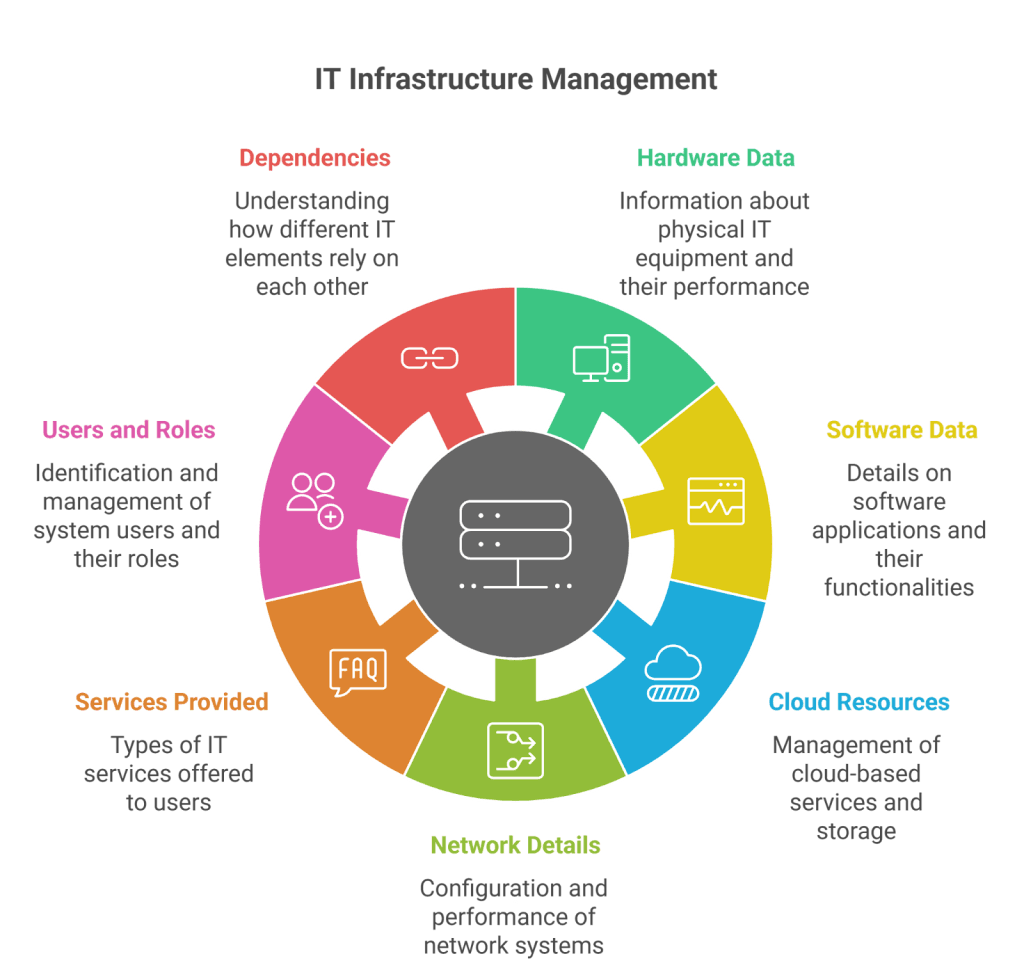
These elements keep a CMDB for change management stable and reliable, while also strengthening broader management systems across IT.
- Automatic IT discovery: Virima scans your environment and updates your CMDB with accurate, current data. This reduces manual work and keeps your change management database reliable by improving data quality continuously.
- One-click updates: You can update configuration items instantly. This speeds up the process and helps maintain clean, consistent records.
- Custom dashboards: Virima displays key metrics in simple views. Teams can track changes, risks, and performance without digging through complex reports.
- Project and change calendars: The platform shows all planned activities in one place. This helps teams avoid scheduling conflicts and prevents overlapping work.
- SLA tracking: Virima monitors service targets and alerts teams when something needs attention. This helps maintain service quality during change cycles.
- Virima Visual Impact Display (ViVID): Virima’s visual engine shows dependencies in clear diagrams. This makes impact analysis easier and helps teams understand risks before approving or implementing changes.
These features help teams make changes quickly and safely.
Why it matters
Virima helps teams work faster and safer during change management. It reduces the effort needed to track assets and prevents mistakes caused by missing or outdated data.
- Reduce outages: Virima shows clear dependencies, so teams can spot risks early and avoid changes that could break critical services.
- Speed up change cycles: With clean data and automated updates, teams can review, approve, and deploy changes much faster.
- Improve compliance: Virima keeps accurate records of what changed, when it changed, and who approved it. This supports internal and external audits.
- Keep configuration data accurate: Automated discovery and visual mapping ensure your change management database stays current and trustworthy.
This makes Virima a strong change management database solution.
Manage change with confidence
Change happens often. A strong CMDB helps you manage it with confidence. A clean CMDB change management process keeps services stable.
Virima’s ITILv4-certified CMDB supports automation and documentation. Discovery scans confirm changes are correct and recorded.
If you want a modern and reliable approach, Virima is the right fit.
Ready to improve your change management?
Request a demo to see how Virima’s change management database helps teams make safer, faster decisions across full-stack service management itsm.
FAQs
1. What is a change management database?
It is a system that stores configuration data used for planning and managing changes.
2. How does a CMDB help in change management?
It shows relationships, dependencies, risks, and impacts including the relationships between cis,itsm processes.
3. Why use a CMDB for change management?
It reduces failures, speeds approvals, and improves accuracy.
4. What is the difference between configuration management and change management?
Configuration management tracks the state of assets. Change management controls how those states change.
5. Can a CMDB reduce change failures?
Yes. It highlights risks, surfaces potential impacts and detects potential issues earlier using trusted cmdb data and consistent asset data.