Cyber security threat detection and mitigation using IT discovery

Picture this: One morning, a routine scan flagged an unknown device quietly communicating with an external IP. No one in the security team recognized the asset. It also wasn’t listed in any inventory.
No one had patched it. No one was watching it. And by the time they traced its origin, sensitive data had already left the network.
This kind of breach didn’t happen overnight—it slipped through unnoticed because something simple was missing: awareness.
Many organizations believe they have full visibility over their IT environment. But in reality, countless assets—forgotten laptops, unmanaged cloud instances, abandoned test environments—exist beyond their radar.
These gaps aren’t just operational oversights; they’re open invitations to attackers.
That’s also why IT discovery isn’t just a nice-to-have. It’s your front line in cyber threat detection and mitigation. By continuously identifying, cataloging, and analyzing every asset, IT discovery exposes hidden risks before they turn into headlines.
This blog explores how IT discovery helps you build a stronger and also smarter cybersecurity posture. It shows you how uncovering what you didn’t know you had is the first step in defending everything you do.
But first,
What is cybersecurity threat mitigation?
Cybersecurity threat mitigation means using smart strategies, tools, and also processes to stop digital threats in their tracks. You don’t just wait for an attack—you act before it happens. This approach helps protect important company data and also networks. The entire process usually happens in three key stages.
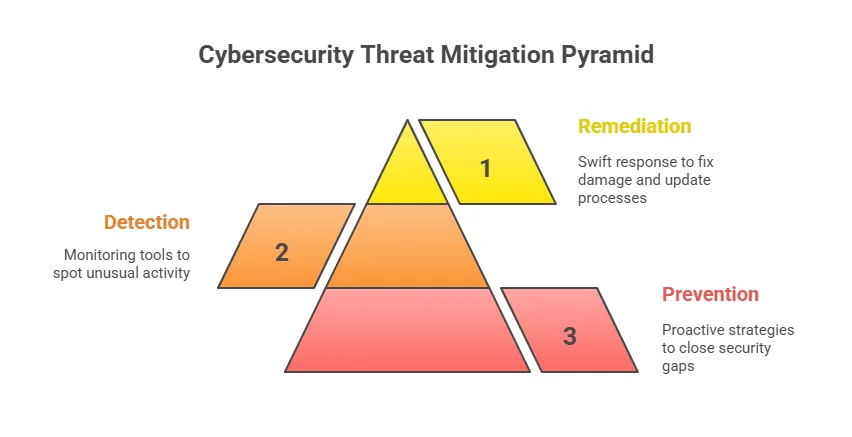
- First comes prevention. Here, you look closely at your current security gaps and figure out how to close them. You might install strong firewalls, use encryption, and also update software often.
These steps help stop threats before they even begin. A solid prevention plan builds the foundation for strong security.
- Next is the detection phase. This is where you identify cyber security threats early—ideally, before they cause harm. You use monitoring tools and also threat intelligence to spot unusual activity fast.
Catching issues early helps reduce the damage and also keeps systems running smoothly. Speed matters most during this stage.
- Finally, there’s remediation. This is your response when a threat gets through. You act fast to isolate the issue and fix the damage.
Then, you update your processes to avoid similar problems later. This step in cyber security threat detection and mitigation shows how well you recover after a security incident.
Why is cybersecurity threat mitigation important?
Cyberattacks can hit any organization, no matter the size. In early 2025 alone, over 8,230 confirmed breaches were reported and the average cost of a data breach climbed to $4.96 million. That number stayed high throughout the first half of the year. These numbers show how serious the risk has become.
A cyberattack doesn’t just affect your finances. It slows down operations, hurts your reputation, and shakes customer trust. But here’s the good news—preventing threats often costs much less than cleaning up after a breach.
So, it makes more sense to act before problems start. That’s where threat mitigation comes in.
Look at real cases from 2025. The Allianz breach exposed data of 1.4 million customers due to a third-party CRM failure. The Texas Department of Transportation leak affected 423,000 records. These incidents show how quickly things can spiral when risks go unchecked.
Threat mitigation does more than protect money. It shields your data, supports your business goals, and builds trust with customers. You don’t just stay safe—you stay ahead.
Let’s break down what that means, starting with one of the most critical areas:
Protecting sensitive data
You need to protect customer data, company secrets, and also other important information. Because, without the right defenses, this data could fall into the wrong hands. Threat mitigation helps keep your systems secure and blocks unauthorized access. This way, you avoid data theft and also protect your business from serious harm.
Maintaining business continuity
Cyber attacks can bring your operations to a halt. They may cause downtime that costs time, money, and also customer trust. With proactive threat mitigation, you also keep your systems running smoothly. You reduce the risk of disruption and also stay ready for whatever comes your way.
To strengthen your preparedness, explore how business continuity planning with Virima can help you respond effectively to unexpected threats.
Preserving reputation
A single data breach can damage your brand image overnight. Customers lose trust fast when their information is at risk. However, strong threat defenses show them you take security seriously. This helps you maintain a good reputation and keep loyal customers close.
Remaining compliant with regulations
Many industries follow strict data security laws. Failing to meet them can lead to large fines and also legal trouble. Threat mitigation helps you meet these rules with confidence. In addition to this it also shows that your business takes responsibility for protecting data.
Addressing insider threats
Cyber security threats don’t always come from the outside. Sometimes, employees can cause harm—intentionally or by mistake. Good security practices help you spot these risks early. With the right tools, you can prevent insider threats before they lead to damage.
Eight types of cybersecurity threats
When you understand the different types of cyber security threats, you can build stronger defenses. Let’s explore eight common threats that your organization should watch out for.
1. Malware attacks
Malware is harmful software like viruses, worms, and also trojans. It can steal data, slow systems, or even crash networks. Every day in 2025, over 560,000 new malware threats are discovered.
One example is “InfernoBot,” a recent AI-powered malware. It spread through cloud-sharing tools and developer file repositories to attack businesses.
2. Phishing attacks
Phishing scams trick you into sharing private information or clicking on harmful links. These attacks often look like emails and also messages from trusted sources. But in reality, they lead you to fake websites or download malware onto your device.
You might not even realize it until it’s too late.
By early 2025, phishing had become the starting point for 91% of cyberattacks. In 2024 alone, there were over 30 million phishing attempts in Australia. Most of these targeted financial services, SaaS platforms, and social media users.
Clearly, attackers go where the data—and the people—are.
3. Data breaches
Data breaches happen when someone gets access to private information without permission. According to Forbes, in early 2024, a massive leak exposed over 26 billion records. Companies like LinkedIn, Adobe, and Dropbox were affected.
Now in 2025, more than 30 billion records have already been compromised around the world. You need to stay alert and protect your data from falling into the wrong hands.
4. Distributed denial-of-service (DDoS)
DDoS attacks flood systems with fake traffic, which blocks access for real users. These attacks can bring down websites, apps, and also servers in minutes. Often, attackers mix DDoS with ransomware or data theft to cause more harm.
They’ve already hit major cloud providers and also government networks this year. You must prepare your systems to handle and recover from such cybersecurity challenges quickly.
5. Ransomware attacks
Ransomware locks your files and demands money to unlock them. In 2025, ransomware cases rose by 126% worldwide. Therefore organizations now face almost 1,925 attacks every week.
While ransom demands average $5.2 million, actual payouts fell to $814 million in 2024. More companies now choose not to pay and instead recover their data in other ways.
6. Zero-day exploits
Zero-day exploits use software bugs before developers can fix them. In 2025, a major attack targeted a SharePoint vulnerability. Hackers broke into over 400 systems in healthcare, education, and finance.
These attacks spread quickly and can go undetected for weeks. That’s why spotting and patching IT security gaps early is so important.
7. SQL injection
SQL injection allows hackers to sneak harmful code into your database queries. This method can expose private customer and also business data. In late 2023, attackers used it to steal two million email addresses from 65 websites.
These attacks show why secure coding and regular testing are key.
8. Insider threats
Insider cyber security threats come from your own employees, partners, or vendors. Sometimes they act on purpose, but often it’s due to carelessness. In 2024–25, 78% of businesses faced at least one insider-related issue.
Common causes include misuse of login credentials, accidental data leaks, or unsafe third-party access. Creating a strong internal security culture helps reduce these risks.
Balancing cyber defense: Proactive detection and reactive mitigation explained
In cybersecurity, protecting your systems takes more than just firewalls or antivirus software. You need a smart and balanced approach. This includes both spotting cyber security threats early and acting fast after an attack. Without both parts, your defenses can often fall short.
Proactive detection helps you find and stop cyber security threats before they cause harm. You stay one step ahead by spotting unusual activity or hidden risks.
On the other hand, reactive mitigation helps you bounce back after something goes wrong. It’s about reducing the impact and getting your systems back on track.
When you use both methods together, you build a stronger defense. You not only lower your chances of being attacked but also recover faster when it happens. That’s how you keep your organization safe and running smoothly.
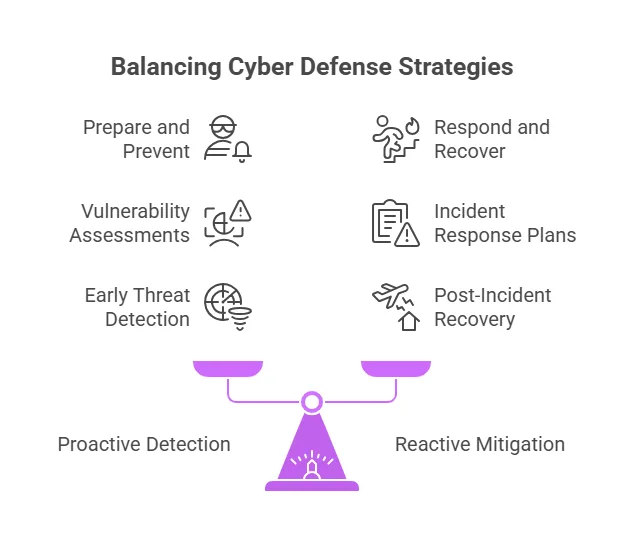
Proactive (detection) components
These aim to identify and stop cyber security threats before they cause harm. The goal is to detect suspicious activity early and strengthen defenses.
Key components include:
- Vulnerability assessments: Scanning systems for known weaknesses.
- Intrusion detection systems (IDS): Monitoring for signs of unauthorized access.
- Threat intelligence: Gathering and analyzing data on emerging cyber security threats.
- Security Information and Event Management (SIEM): Correlating logs to detect anomalies.
- Penetration testing: Simulating attacks to find exploitable flaws.
- Behavior analytics: Identifying unusual user or system behavior.
These tools help organizations anticipate and also prepare for attacks before they happen.
Reactive (mitigation) components
These respond after an incident has occurred, focusing on minimizing damage and also restoring operations.
Key components include:
- Incident response plans: Step-by-step processes to handle security breaches.
- Intrusion prevention systems (IPS): Blocking or quarantining detected cyber security threats.
- Backups and disaster recovery: Restoring data and systems after attacks.
- Patching and remediation: Fixing vulnerabilities after discovery.
- Digital forensics: Investigating how the breach occurred.
- Security alerts and SOC response: Activating defense teams to contain cyber security threats.
Reactive components ensure that when something goes wrong, the damage is controlled and recovery is swift.
Summary
- Proactive = Prepare and prevent
- Reactive = Respond and recover
Both are critical for your cybersecurity success. You need tools that detect cyber security threats early and also alert you quickly. At the same time, you should stay ready to respond when something goes wrong.
A balanced strategy combines both smart detection and strong incident handling. This way, you stay protected and prepared.
Okay, but what’s the difference between threat mitigation and remediation
Before diving into the differences, it’s important to know one thing. People often use the terms “mitigation” and “remediation” as if they mean the same. But in cybersecurity, they have different purposes. Knowing when to use each can help you respond better to security threats.
Mitigation means taking steps to reduce risks before something bad happens. You try to keep risks low and stay prepared. For example, you might update software, limit user access, or provide security training.
These steps also help you avoid or lessen the impact of future attacks.
On the other hand, remediation happens after a cyberattack hits. It’s how you respond and fix the damage done.
This includes removing malware, investigating what went wrong, and restoring your systems. Your goal here is to recover quickly and stop the threat from spreading.
| Feature | Mitigation | Remediation |
| Objective | Prevent or reduce the likelihood and impact of cyber threats. | Repair and also recover from the effects of a security incident. |
| Action type | Implementing preventive actions to avert attacks. | Taking corrective actions after a breach occurs. |
| Scope | Addresses potential risks and vulnerabilities across systems. | Focuses on resolving the particular issues caused by an incident. |
| Process involvement | Requires ongoing monitoring, updating, and training. | Activated only after a breach is detected. |
| Outcome | Enhanced security posture, reduced risk of incidents. | Restored systems, patched vulnerabilities, and lessons learned for future prevention. |
10 best practices of cyber security threat detection and mitigation
Now that you understand the importance of cybersecurity and its types, let’s explore how to protect your organization. Taking action starts with understanding your risks and creating a cybersecurity response plan to handle threats.
1. Start with a comprehensive cyber risk assessment
First, identify the cyber security threats your organization is most likely to face. These can include phishing, ransomware, insider threats, or supply chain attacks. Then, check how exposed your systems are to these risks.
This allows you to focus your efforts on the most serious problems.
Your assessment should include:
- Clear scope definition (e.g., entire infrastructure or critical systems only)
- An inventory of digital and physical assets
- Threat likelihood and potential impact
- Cyber risk mitigation strategies (accept, reduce, transfer, or avoid)
- A risk register is updated regularly
Use frameworks like NIST CSF 2.0 and ISO/IEC 27001:2022 to guide the process.
2. Build and maintain an incident response (IR) plan
Since attacks are growing smarter, you need a strong and tested incident response plan. This plan helps you act fast, reduce damage, and recover smoothly. Without it, even small cyber security threats can spiral out of control.
Key elements of an IR plan include:
- Defined roles and responsibilities
- Threat scenarios and escalation procedures
- Regular tabletop exercises and red team simulations
- Communication protocols for internal and external stakeholders
Always update your IR plan using lessons learned from real incidents and the latest threat intelligence.
You may also like: What are the essentials of crafting a strong cybersecurity plan
3. Invest in ongoing cybersecurity training
A report shows that 85% of security breaches involve human error. That number alone highlights a serious risk. You can have strong firewalls and antivirus software, but one wrong click can undo it all.
That’s why security awareness training isn’t optional anymore. You need it to protect your team and your data.
Best practices:
- Include security training during employee onboarding
- Schedule regular updates on emerging cyber security threats like AI-generated phishing
- Simulate real-world attacks to build response skills
- Reinforce safe practices for remote and hybrid teams
Make training interactive and scenario-based to improve engagement and retention.
4. Monitor and protect network traffic continuously
Real-time monitoring helps you spot suspicious activity before it becomes a bigger problem. You can also catch cyber security threats early and act fast. Firewalls and intrusion detection systems (IDS) play a big role here.
They protect your network by checking both incoming and outgoing traffic. Along with these, threat intelligence tools give you updates on known risks.
To improve network defense:
- Use next-gen firewalls with application-layer filtering
- Enable logging and analytics for all traffic
- Segment networks to limit lateral movement
- Use Zero Trust Network Access (ZTNA) policies
- Encrypt remote connections with secure VPNs
5. Enforce strong access controls and password policies
Weak passwords are still a major vulnerability. In 2025 and beyond, organizations should implement stronger identity and access management (IAM) practices.
Here’s how:
- Enforce password complexity and change policies
- Deploy multi-factor authentication (MFA) across all systems
- Use passwordless authentication where possible
- Adopt enterprise-level password managers
- Monitor failed login attempts and lock accounts after multiple tries
6. Apply software updates without delay
Unpatched software gives attackers an easy way in. They often take advantage of known security holes just days after they’re revealed. These are called “zero-day” exploits because they happen almost immediately.
If you don’t act fast, your systems stay exposed. That’s why regular patching matters more than ever.
Recommendations:
- Automate patch management across OS, apps, and firmware
- Use vulnerability scanners to detect outdated systems
- Test patches in staging environments for critical systems
- Schedule regular maintenance windows for updates
7. Back up and encrypt all critical data
Data backups are your last line of defense when ransomware hits or systems suddenly fail. At the same time, encryption adds an extra layer of protection.
Effective strategies include:
- Encrypt data at rest and in transit
- Use off-site or cloud-based backup security solutions
- Follow the 3-2-1 backup rule (3 copies, 2 media types, 1 offsite)
- Regularly test backup restorations
- Implement immutable backups to prevent tampering
8. Strengthen physical security measures
You often hear about digital cyber security threats, but physical access can be just as risky. When someone can walk up to your server or device, your data becomes easy to steal.
So whether you use on-premise servers or allow remote work, protecting your physical assets matters.
Steps to secure physical assets:
- Limit access to server rooms and IT hardware
- Install biometric or keycard-based entry systems
- Secure ports and disable unused USB interfaces
- Provide secure lockers or containers for BYOD devices
- Establish protocols for lost or stolen devices
9. Evaluate and monitor third-party risk
Third-party breaches are increasing, especially through software supply chains and managed service providers. These partners often handle sensitive data and have access to your systems.
That’s why keeping an eye on their security is no longer optional. You need to treat partner security as a constant priority, not a one-time checklist.
Vendor risk management tips:
- Conduct security assessments before onboarding vendors
- Require compliance with standards like SOC 2 or ISO 27001
- Maintain SLAs with security and breach reporting clauses
- Review vendor access logs and data-sharing practices
- Create contingency plans for service interruptions
10. Stay compliant with evolving cyber regulations
Regulatory bodies now enforce stricter rules for data privacy and cybersecurity across the world. You can’t afford to ignore them. If you fail to meet these standards, you risk more than just financial penalties.
In fact, you could lose the trust of your customers. That damage is often harder to repair than a fine.
To ensure compliance:
- Stay updated on local and international laws (e.g., GDPR, HIPAA, PCI DSS 4.0)
- Conduct regular audits and gap assessments
- Maintain documentation for all security controls
- Train staff on compliance responsibilities
- Appoint a compliance officer or DPO (Data Protection Officer)
Modern Cybersecurity: How discovery tools support cyber security threat detection and mitigation
Using an IT asset discovery tool can greatly improve your cybersecurity. It helps you see all the devices and software in your network. With that clear view, you can spot anything unfamiliar or risky.
This makes it easier to prevent cyber security threats before they cause damage. As a result, your team can respond faster and with more confidence.
Now, let’s explore a few key benefits in detail:
Integrates security into every organizational workflow
Using asset discovery software is a smart first step in building security into your daily workflows. These tools scan your network to find all connected hardware, installed software, and system settings.
Moreover, you get a clear view of everything running in your environment. With that knowledge, you can further make better decisions about how to protect your systems.
By running regular scans, you make sure every asset stays updated with the latest patches and settings. This also helps reduce your risk of cyberattacks. Since known vulnerabilities get fixed early, attackers have fewer chances to break in.
You’re not just fixing issues—you’re staying ahead of them.
Also, discovery tools help you track changes in your environment. They alert you when a new device shows up or when something gets removed. This way, you always know what’s happening in your network. That kind of awareness is key to keeping your systems secure.
Improved end-to-end visibility into your IT infrastructure
Using an asset discovery tool gives you full IT asset visibility into your entire IT infrastructure. You can easily see all devices, from mobile phones to cloud-based systems. These tools show you accurate details about hardware, software, and security setups.
That means you can quickly find potential risks before attackers do. You’ll also catch malicious activity as it happens.
Asset discovery also helps you take control of patching and system configurations. You can view available patches for each system in one place. With automated patching, your team can fix issues faster and save time.
This keeps your systems secure without slowing down your operations. It’s a smarter, more efficient way to manage cyber hygiene.
Move from reactive to proactive incident management
Move from reacting to preventing problems before they occur. In the past, IT teams waited for issues to show up. They depended mostly on firewalls and antivirus tools. But modern IT security threats are stealthier and harder to catch.
That’s why waiting doesn’t work anymore.
Instead, you need to spot problems before they grow. Asset discovery helps you track new devices, hidden misconfigurations, and weak points in real time. You can also monitor network traffic closely and flag risky behavior right away.
Overall, this proactive strategy keeps your organization one step ahead of cyber security threats. You act early, before real damage happens.
Provides a single source of truth for security management
Asset discovery tools also serve as a single source of truth for security teams. You can view all assets from one dashboard. No more jumping between different tools to get the full picture.
That means faster responses and fewer missed threats. Your team stays focused on what matters—fixing vulnerabilities before they become attacks.
Risks of not using asset discovery for cyber security threat detection and mitigation
You’ve already seen how asset discovery tools help your IT operations. But what if you skip them altogether? Choosing to avoid automated discovery tools comes with serious risks. These risks can also affect how well your IT team performs.
Let’s now explore what can go wrong—and how these issues might slow you down or expose you to cyber security threats.
Increased attack surface on applications and devices
Asset discovery is a key part of your cybersecurity strategy. Moreover, it helps you find and track all hardware and software in your environment. This way, you can manage them before and after issues arise.
But without a discovery tool, your applications and devices become easy targets. Hackers can also spot missed updates or security patches and use them to enter your network.
Worse, you may overlook devices like printers, switches, or routers. These often go undetected until an incident occurs. By then, it might be too late to prevent damage. That’s why knowing every connected device matters.
Lack of visibility into unknown assets within your network
To protect your network, you first need to understand it. This includes knowing which assets are connected and how they behave in real-time. Without a discovery tool, you further lose that clear view.
Unknown assets stay hidden until something breaks or a threat appears. For instance, an employee might connect a personal laptop and unknowingly expose your network.
As networks grow with more devices each year, that risk increases. Using a discovery tool helps you see everything and stay ahead. It gives you peace of mind that no device is left unchecked.
Related reads worth exploring –Your essential guide to cybersecurity asset management platform
Lack of compliance with regulatory measures
Staying compliant with cybersecurity rules is a must. Asset discovery tools help by showing exactly which assets are on your network.
Without them, you risk breaking rules like SOC2 without even knowing it. This could further lead to big fines and legal trouble.
Also, old systems and software might go unnoticed and stay vulnerable. Plus, you may even miss software updates, leaving your network open to cyber security threats.
Checking every system manually takes time and increases the chances of error. That’s why discovery tools are not just helpful—they’re necessary.
Inaccurate inventory of existing assets from your network
Tracking every asset by hand takes time and often leads to mistakes. Without a proper tool, your inventory may be incomplete or outdated. You won’t know which devices are active, where they are, or what they do. That lack of insight can also weaken your security and put sensitive data at risk.
For example, let’s say a remote employee uses their phone to access company data. If the device isn’t tracked, it opens a door for cyber security threats.
Failing to monitor such devices can also lead to compliance violations. So, having accurate asset data keeps you secure and compliant.
5 ways asset discovery can improve your cybersecurity posture
Here are five ways you can use an IT discovery tool to strengthen your cybersecurity posture:
Identify incident root cause quickly using IT discovery tools
When an incident happens, finding the root cause quickly helps reduce IT downtime and prevents repeat issues. IT discovery tools can make this process much easier. These tools scan your network and collect data from all connected assets.
This also gives you a complete picture of what’s involved in the issue and speeds up your investigation.
Most discovery tools also include helpful features like:
- Automatic asset monitoring
- Real-time alerts
- Incident tracking capabilities
These features help you spot changes quickly and respond faster. You can also combine this data with manual checks, such as:
- Reviewing system logs
- Collecting user input
- Running basic questionnaires
This approach helps you get to the root cause faster—without missing important details.
Prioritize security incidents based on threat levels
Not all security incidents pose the same risk, so it’s smart to address the most serious ones first. Start by identifying the affected assets and how important they are to your business. Then, assess threat levels based on:
- Sensitivity of the data involved
- Risk of financial loss
- Compliance or regulatory impact
- Potential damage to your reputation
- Importance of system functionality
Once you know the threat level, you can decide which incidents need immediate action. This also helps your team stay focused, even during high-pressure situations.
To do this effectively, you need all asset details in one place. An asset discovery tool gives you:
- A clear inventory of IT assets
- Up-to-date information about each asset’s risk profile
- A faster way to analyze and prioritize cyber security threats
With the right data in hand, you can take the right steps at the right time.
Enrich data and add context during vulnerability management
When you automate asset discovery, your IT team can quickly identify which applications and services run on each device. This is especially helpful when patching systems or updating existing applications to fix vulnerabilities.
Also, these tools offer context about each asset’s configuration and current security status. That way, you can prioritize what needs attention first. You’ll spend less time guessing what happened in shadow IT and more time fixing real issues.
By tracking how an asset enters and moves through your network, you get the full picture. This helps your team make smart decisions and detect problems faster. So instead of working blindly, you can use detailed insights to guide your actions.
Improve incident response times through real-time collaboration
Discovery tools are crucial for improving incident response times through real-time collaboration. It provides an up-to-date map of assets that security teams can use to understand their environment.
Overall, this speeds up incident response by enabling rapid assessment of the affected areas.
Also, these tools support real-time collaboration across departments. When teams have the same up-to-date information, they act faster and more confidently.
You can detect suspicious activity or unusual changes before they become bigger problems. Every second counts—and these tools make sure you don’t waste any.
Continuously monitor and identify vulnerabilities within your infrastructure
You need to know what’s in your network before you can protect it. Asset discovery tools give you clear IT visibility. They scan your systems nonstop and alert you when something new appears or changes. This way, you can quickly find weak points and fix them before attackers get a chance.
These tools also send real-time alerts when they spot unusual activity. That means you can respond without delay. With Virima’s ViVID feature, you can take it even further by overlaying vulnerability data on the discovered assets.
You’ll instantly see which devices or applications pose the biggest risk, so you can focus on fixing the most critical issues first.
When you pair that with automated discovery, your security gets smarter over time. You’ll spend less time chasing problems and more time solving them.
Use Virima’s IT discovery tool for cyber security threat detection and mitigation
Asset discovery plays a key role in your cybersecurity strategy. You need to know what devices connect to your network. This also helps you protect them and reduce risks. Without this step, attackers could find and use weak points.
So, staying informed about IT security updates and applying them quickly is crucial.
Once you begin asset discovery, treat it as a continuous process. New devices often join your network. Others may change settings over time.
You must also update your asset data regularly to keep it accurate. This way, you avoid gaps that hackers could exploit.
Also, make sure your network stays secure and set up correctly. Use a network scanning tool like Virima to help with this. It can find open ports or incorrect settings on your devices.
These flaws could further let attackers in if you don’t fix them. With the right tools, you stay one step ahead of cyber security threats.
If you are looking for an IT discovery tool to improve cybersecurity, book a demo with Virima today.
FAQ’s on cyber security threat detection and mitigation
1. How does IT discovery help prevent attacks?
IT discovery helps you identify every device, app, and service on your network. When you know what exists, you can also detect unknown or unauthorized assets faster.
You can also patch vulnerabilities sooner and remove the blind spots attackers often exploit. Moreover, this clear visibility strengthens your overall security.
2. What role does Virima play in proactive threat mitigation?
Virima integrates with the National Vulnerability Database (NVD) to identify risks early. It also provides real-time maps of assets and their relationships.
This helps your team assess IT security risks and respond fast, before problems grow. You stay ahead of threats, not behind them.
3. How can I improve threat detection in my organization’s IT network?
Start by gaining full visibility into your IT environment. Virima’s automated discovery tools scan and map your assets constantly. You also get a real-time view of hardware, software, and device relationships.
With this, you can detect shadow IT, unauthorized changes, or signs of threats. You can also connect Virima to SIEM tools or vulnerability scanners for even stronger detection.
4. How can I reduce security risks with better IT asset inventory management?
You can reduce risks by keeping an accurate inventory of all IT assets. Virima automatically catalogs everything across cloud, on-prem, and remote setups. Moreover, it keeps your asset data current in one place.
You’ll easily spot outdated systems, unpatched software, or non-compliant devices. With ViVID’s dependency maps, you’ll also see how each risk affects business services.