What Is a CMDB? Configuration Management Database Explained

What Is a CMDB? Configuration Management Database Explained

A configuration management database (CMDB) is a structured repository that stores data about an organization’s IT assets, called configuration items (CIs), and the relationships between them. It tracks hardware, software, cloud resources, service dependencies, ownership, and change history in a single system, giving IT teams the verified context they need to resolve incidents, manage changes, and govern how AI agents act on infrastructure data. If your CMDB is outdated or siloed from your ITSM workflows, your teams are making decisions with incomplete information.

What Is a CMDB? Configuration Management Database Explained

TL;DR:

A configuration management database (CMDB) is a centralized system that stores information about IT assets, known as configuration items (CIs), and how they relate to one another. It tracks hardware, software, cloud resources, and their interdependencies to support ITSM processes such as incident, change, and problem management. A well-maintained CMDB gives IT teams current visibility and control so they can deliver reliable, secure, and efficient services.

What Is a CMDB? A Clear Definition

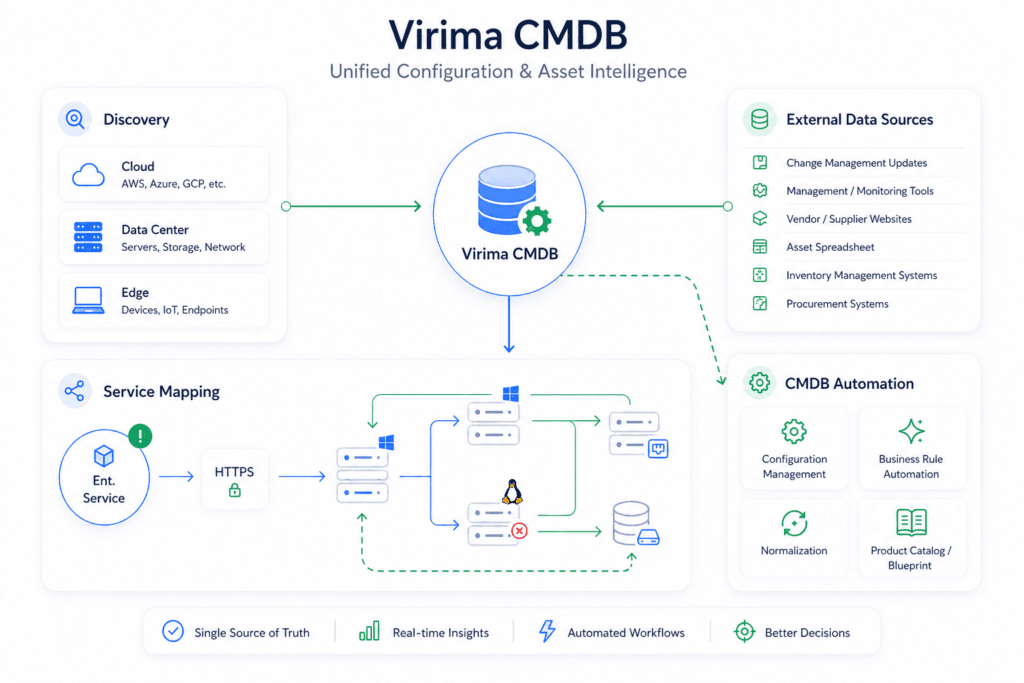
A CMDB is a central database that holds organized data about an organization’s IT assets. These assets are called configuration items, and the database records how those items depend on each other. It gives IT Service Management (ITSM) and operations teams a single, authoritative source of information so they can track and manage infrastructure, applications, services, and the connections between them.

A CMDB goes beyond inventory. It records important details such as software versions and hardware specs, and it captures relationships, for example, “depends on” or “hosted on.” Those relationships define how CIs work together and what breaks when one changes.

Your CMDB as an IT City Map

Think of your IT environment as a sprawling city. The CMDB is the city’s central planning map. It shows buildings (servers), roads (network paths), power lines (dependencies), and zoning details (usage policies). Without this map, IT planning and incident response become chaotic quickly.

A CMDB in action

Imagine an online retail platform powered by many interconnected microservices. One service fails, disrupting payments. Without a CMDB, teams spend hours tracing logs and making calls. With a well-implemented CMDB, the IT team quickly visualizes the issue and traces it to a server that was recently patched. The cause is pinpointed and service is restored quickly.

Discovery-driven root cause analysis with ViVID™ service maps

Now imagine that same failure scenario with ViVID™ service maps from Virima. Instead of static data, you get an interactive view built from discovery data. You see that the affected CI connects to a misconfigured firewall or a cloud-hosted database with altered settings. You click into that CI’s history, identify the likely root cause, and notify the right team within minutes.

What Does a CMDB Contain?

A well-stocked CMDB typically includes:

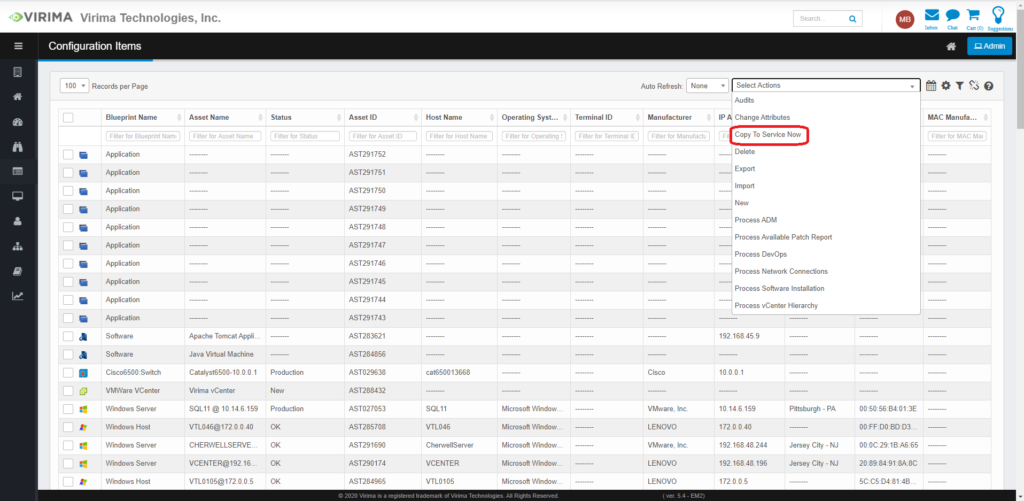
  • Hardware: servers, routers, switches, workstations
  • Software: applications, databases, licenses
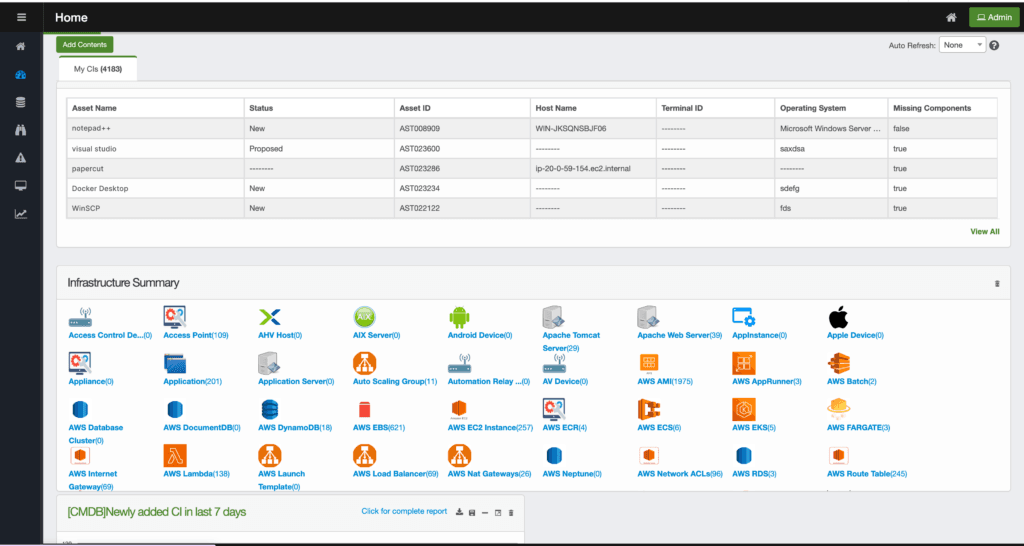
  • Cloud assets: VMs, containers, SaaS
  • People and processes: responsible parties, SLAs, runbooks
  • Attributes: version, status, owner, location
  • Relationships: dependency and impact mapping

A CMDB tracks both technical and non-technical entities. Technical entities include business services, applications, operating systems, hardware, networks, and containers. Non-technical entities cover users, customers, service agreements, and locations. What distinguishes a CMDB from a basic asset list is the relationships layer, specifically how each CI connects to others, what services it supports, and who is responsible when something changes.

What Should Go in Your CMDB — and What Shouldn’t

A common implementation mistake is trying to track everything from day one. Overpopulating a CMDB with low-value CIs makes it harder to maintain and faster to degrade. A better approach is to start with service-critical CIs and expand deliberately.

Start here:

  • Infrastructure supporting your most critical business services (e-commerce, ERP, HR systems)
  • Applications and services with cross-team dependencies
  • Cloud assets tied to production workloads

Leave out initially:

  • Peripheral hardware with no service interdependencies (monitors, keyboards)
  • Disposable or short-lived assets (containers rebuilt on each deploy)
  • Financial metadata better managed in an IT asset management system

Non-technical entities such as users, SLAs, and runbooks are worth including once your core CI structure is stable. Cloud services from AWS and Azure should be added through API connectors as soon as cloud workloads are in scope for incident or change management. The goal is a CMDB with the right data, not the most data.

CMDB vs. IT Asset Management: What Is the Difference?

What is CMDB is often confused with asset management. While both track IT components, their purposes differ.

FeatureCMDBIT Asset Management (ITAM)
FocusConfiguration and relationshipsOwnership and IT lifecycle management
GoalService delivery visibilityFinancial optimization
ExampleMap of servers linked to a web appLaptop inventory with purchase dates
Tool alignmentITSM, change, incident workflowsProcurement, accounting, lifecycle management

A CMDB shows how things work together. An asset management system shows what you own and its value. Most organizations benefit from running both: ITAM answers “what do we have?” and a CMDB answers “what happens if this changes?”

The Role of a CMDB in ITIL

According to ITIL 4, a CMDB supports configuration management by maintaining accurate data about vital CIs for effective ITSM. It plays a central role in incident management, change enablement, problem management, and service continuity.

What is CSDM and how does it relate to a CMDB?

The Common Service Data Model (CSDM) is a ServiceNow framework that provides a standardized structure for organizing service and configuration data. A CMDB provides the CI data that CSDM requires to map technical components to business services. Organizations using ServiceNow benefit when their CMDB is populated through high-frequency discovery cycles, because CSDM alignment depends on accurate, current CI relationships, not manually maintained records.

Why Is a CMDB Important?

Understanding what a CMDB does is foundational for IT operations success. Here is why it matters:

  • Faster incident resolution. Teams locate the issue, identify dependent infrastructure, and restore service quickly.
  • Smarter change management. Assess risk and identify affected services before making any change.
  • Improved compliance and audit readiness. Access configuration records during audits without scrambling for data.
  • Strategic decision-making. CMDBs reveal service dependencies and cost structures that drive better planning.
  • Stronger business alignment. Service-to-user mappings help IT communicate more effectively with stakeholders.

Industry research indicates that only 25% of organizations derive meaningful value from their CMDB investments. The most common reasons: data that goes stale, unclear CI ownership, and poor integration with ITSM workflows. A CMDB fails not because the concept is flawed, but because it is treated as a one-time setup rather than an actively maintained system of record.

Benefits of a CMDB

A discovery-sourced CMDB delivers measurable operational impact. Research shows that 91% of medium and large enterprises report the cost of a single hour of downtime exceeds $300,000. A CMDB with current CI data reduces mean time to resolution (MTTR) by replacing guesswork with targeted remediation. Teams see what changed, what depends on what, and who owns it before they start troubleshooting.

Here are the standout benefits:

  • Centralized visibility. One map of your entire IT landscape: current, unified, and actionable.
  • Faster incident resolution. Identify failing components quickly and reduce MTTR.
  • Smarter risk management. Analyze change impacts before acting.
  • Audit readiness. Access historical records and maintain compliance with ease.
  • Improved security posture. Detect shadow IT, misconfigurations, and vulnerabilities.
  • Team collaboration. Shared context enables faster, more aligned decisions.
  • Reliable service delivery. Better visibility supports better uptime.
  • Informed strategic decisions. Budgeting, planning, and modernization become data-driven.

See how a discovery-sourced CMDB delivers Trusted Runtime Truth for your IT environment. Explore the Virima approach →

Modern CMDB Challenges and Solutions

A CMDB provides a solid foundation for IT service management, but real-world implementations face common hurdles. Gartner forecasts that through 2027, 50% of critical enterprise applications will reside outside centralized public cloud locations. That kind of distributed footprint makes an accurate, discovery-sourced CMDB more valuable than ever.

1. Data staleness in dynamic environments

Problem: In hybrid and cloud-first architectures, teams provision and decommission assets in minutes. Manually updated records go stale quickly, which undermines the CMDB as a trusted reference.

Solution: Discovery-driven synchronization keeps data current. Virima IT Discovery uses agentless, high-frequency discovery cycles that update configuration items through APIs, so your CMDB reflects the current state of the environment — physical, virtual, or cloud-native.

2. Lack of cloud visibility

Problem: Traditional CMDBs were designed for static, on-premise systems and often miss dynamic cloud assets. SaaS applications, serverless functions, and ephemeral workloads such as containers create blind spots.

Solution: Modern CMDBs should include connectors for AWS and Azure and popular SaaS platforms. These give visibility into elastic and transient cloud resources, revealing asset metadata and interdependencies across hybrid environments.

3. Alert fatigue without context

Problem: CMDBs often feed monitoring tools that generate a barrage of alerts without context. IT teams chase symptoms instead of root causes, which slows response and raises operational costs.

Solution: Integrating CMDB data with AIOps platforms turns raw alerts into meaningful insights. By adding CI relationships, impact zones, and business priorities, AIOps can correlate incidents, reduce noise, and surface the issues that matter most.

4. Poor data ownership and accountability

Problem: Even with discovery in place, CMDBs require stewardship. Without clear CI ownership, data becomes fragmented and trust erodes.

Solution: Modern CMDBs support role-based ownership models. Each CI has a specific owner responsible for validating its attributes, and dashboards notify stakeholders when data becomes stale or inconsistent.

5. Integration gaps with ITSM ecosystems

Problem: Many legacy CMDBs are siloed from the broader ITSM stack. They lack API support and do not work well with change, incident, or problem management tools.

Solution: A modern CMDB requires flexible, API-first architecture. Virima integrates with ServiceNow, Ivanti, Halo, Jira Service Management, Xurrent, Hornbill, and TeamDynamix. These integrations let data move between systems, creating a unified view of services and better coordination across IT operations, DevOps, and business teams.

CMDB Best Practices

Knowing what a CMDB is only starts the journey. To get real value, follow these practices that support accuracy, scalability, and long-term utility.

1. Define clear objectives.
Start by asking why you are implementing a CMDB. Whether the goal is faster incident response, better change control, or audit readiness, your objectives should reflect business-aligned goals and drive what data you collect.

2. Start small and scale strategically.
Map your most critical service first — an e-commerce platform, HR system, or CRM. This pilot approach delivers quick wins, surfaces data challenges early, and demonstrates value to stakeholders. See how to build a CMDB using a service-first approach.

3. Keep data current through discovery.
Manual CI updates are error-prone and do not scale. Use discovery and synchronization tools that update CIs through network scans, cloud APIs, and agentless collectors.

4. Review regularly and validate data quality.
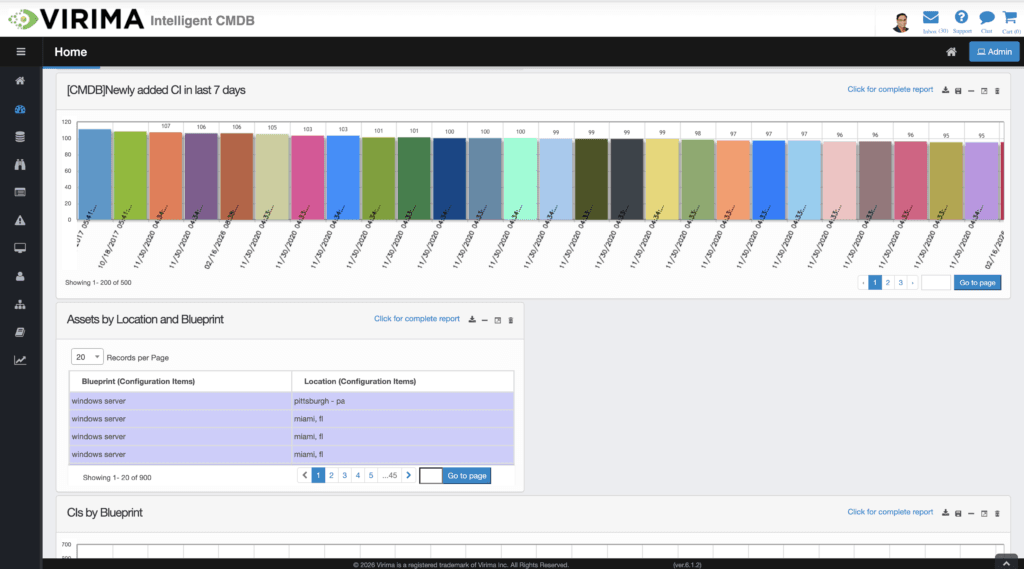
Even with discovery in place, regular audits matter. Use dashboards, reports, and quality scores to assess CMDB health. Track KPIs such as data freshness, completeness, and compliance.

5. Assign and enforce ownership.
Without accountability, CMDBs become outdated. Assign each CI or group of CIs to a responsible owner or team. This stewardship model empowers domain experts to maintain the sections they know best.

6. Integrate with ITSM systems.
A CMDB delivers the most value when embedded in your broader ITSM ecosystem. Integrating with platforms such as Jira Service Management and Ivanti supports data exchange across incident, change, problem, and asset management workflows.

7. Map relationships clearly and visually.
A list of assets alone is not a CMDB. The value comes from mapping relationships and dependencies between assets. ViVID™ service maps from Virima generate interactive visualizations that turn raw CMDB data into actionable insight. For a deeper reference, see our guide to CMDB best practices.

Request a Virima demo and see how discovery-sourced data keeps your CMDB accurate across hybrid and cloud environments.

Your CMDB as the Foundation for Agentic IT Operations

The CMDB’s role has expanded well beyond incident response and change management. As organizations deploy AI agents to handle routine IT tasks — closing tickets, triggering changes, validating configurations — those agents need verified, current CI data to act safely.

An AI agent that triggers a change based on a stale CMDB can cause outages across services it did not know were connected. What prevents this is a CMDB with high-frequency discovery cycles and CI confidence scoring: a live measure of data freshness that tells the agent whether the current record is trustworthy enough to act on. If confidence falls below threshold, the agent pauses and requests a data refresh before proceeding. This is what Virima calls Trusted Runtime Truth — discovery-sourced CI data that includes current relationships, ownership, blast radius, and change history.

A CMDB built for agentic IT operations provides more than CI records. It provides a trust plane: a regularly refreshed, explainable source of ground truth that AI agents can query before triggering any change. Without this foundation, autonomous IT operations carry hidden risk. With it, teams move faster and AI agents act safely.

For a full treatment of what your CMDB needs to support AI agents, read our guide to CMDB for AI agents.

How Does a CMDB Feature in ITSM Processes?

A well-maintained CMDB makes IT operations smarter, faster, and more reliable. Here is how it strengthens key ITSM functions.

1. Incident management: pinpoint failures faster

When IT services go down, every second counts. A CMDB helps incident response teams quickly identify which CIs are affected and trace the dependencies behind a failure. It can show that a database server was recently updated or a firewall rule changed, reducing MTTR by replacing guesswork with targeted remediation. With current CI data and relationship mapping, teams often restore service before most end users notice disruption.

2. Change enablement: analyze impact before acting

The CMDB shows how proposed changes might affect connected services and systems. Before approving a change request, such as upgrading a shared application or shutting down a server, teams check the CMDB to find related CIs, services, and business users. This foresight reduces unexpected outages and shifts change enablement from reactive firefighting to proactive planning.

3. IT problem management: uncover recurring issues

Recurring incidents often indicate a deeper problem. The CMDB supports problem investigation and trend analysis with historical data, CI relationships, and patterns from past incidents. If one storage cluster causes multiple outages across applications, the CMDB connects those incidents to the same CI, supporting root cause analysis and long-term fixes that reduce ticket volumes.

4. Service mapping: visualize dependencies

A modern CMDB shows how CIs relate to each other and the services they support. With ViVID™ service maps, teams see which applications rely on which infrastructure across on-premise and cloud setups. This bird’s-eye view is critical for maintaining uptime, troubleshooting, auditing, and planning future changes. The EMA ServiceOps report highlights how discovery maturity directly correlates with operational resilience.

5. Capacity planning: forecast demand accurately

The CMDB provides visibility into current resource utilization, dependencies, and scaling trends. IT teams see how services are growing and which CIs are reaching their limits, supporting smart decisions about scaling, upgrades, consolidations, and cloud migrations.

Build a CMDB That Works for the Long Run

What a CMDB is comes down to this: a control center, not a catalog. In fast-paced, distributed environments, a CMDB gives you the visibility, context, and confidence to deliver dependable IT services. The organizations that get full value from their CMDBs treat data accuracy as an ongoing discipline, not a one-time setup task.

At Virima, we pair discovery-sourced data with ViVID™ service maps and strong ITSM integrations to align IT with business goals. Whether you are starting your first CMDB project or improving an existing one, Virima is ready to help.

Schedule a Virima demo and see how Trusted Runtime Truth keeps your CMDB accurate and your AI agents acting safely.

FAQs About CMDB

Q1: What is a CMDB in ITIL?
In ITIL 4, a configuration management database (CMDB) is a system that stores configuration data about CIs and their relationships. It supports the configuration management practice by providing accurate, current data for decision-making across incident, change, problem, and service continuity management. ITIL defines CMDBs not as optional tools but as a required component of sound configuration management.

Q2: What is the purpose of a CMDB?
The purpose of a CMDB is to provide visibility, traceability, and control over an organization’s IT environment. It gives IT teams the context they need to make informed decisions, assess change risk, respond to incidents faster, maintain compliance, and support AI-driven operations with verified CI data.

Q3: How does a CMDB support change management?
By showing which services, infrastructure, and users are affected by a proposed change, a CMDB lets teams assess risk before approving any change request. This reduces the chance of unintended outages and provides an audit trail for every change made.

Q4: Why do CMDB projects fail?
Industry research indicates only 25% of organizations derive meaningful value from their CMDB investments. The most common causes are data staleness, poor CI ownership, lack of integration with ITSM tools, and treating the CMDB as a one-time project rather than an ongoing operational discipline.

Q5: What is an example of a configuration item (CI)?
A configuration item is any component that needs to be managed to deliver an IT service. Common examples include servers, applications, routers, virtual machines, SLAs, and cloud workloads. For a deeper look at how CIs are structured, see our guide on configuration items in a CMDB.

Q6: Can CMDBs track cloud assets?
Yes. Cloud-aware CMDBs use API connectors for AWS and Azure to discover and track ephemeral resources such as virtual machines, containers, and SaaS applications. These connectors update CI records through high-frequency discovery cycles, so cloud assets are reflected accurately even as they are provisioned and decommissioned.

Q7: What does a CMDB need to support AI agents?
An AI agent acting on IT infrastructure needs CI data that is verified, current, and explainable. This means a CMDB with high-frequency discovery cycles, CI confidence scoring (a freshness metric the agent can query before acting), and relationship data that shows blast radius. Without this foundation, autonomous IT operations carry hidden risk. See our full guide to CMDB for AI agents for detailed requirements.

Similar Posts